What kind of video, and which way to make it
Start with the kind of video, because it decides whether you need a video model at all.
| Kind of video | What it's made of | Generated footage? |
|---|---|---|
| Story or ad with characters or a product | Generated shots, a voice or dialogue, music and an edit | Yes, for every moving shot |
| Narrated explainer | Narration and captions over motion graphics, illustrations, stills or stock footage | Sometimes, for a few shots |
| Presenter (avatar) video | A generated presenter reading a script, often with slides | From an avatar tool rather than a general video model |
| Motion graphics and code-rendered animation | Animated text, shapes, logos, charts and screens, rendered from code or templates | No |
Half of our own 22 test projects used no generated footage: they were motion graphics, animated stills and rendered text (n=11). The walkthroughs below include one of them, next to two films with generated footage. Most of this guide is about generated footage, which cost about 24 times as much per finished minute in our projects.
One generation lasts seconds
Video models make one shot at a time. The longest single take we found was 30 seconds, and several popular models stop at 8 to 15. A film with characters, dialogue or product shots is therefore many shots plus sound plus an edit, whoever does the assembling.
| Model | Single take |
|---|---|
| Kling 4.0 | 3–30 secondsVideo Extension to “up to 2 minutes” in total; the release notes mark it “coming soon” |
| Seedance 2.5 | Up to 30 seconds“with the option to extend twice” |
| Wan 3.0 | Up to 30 seconds |
| Luma Ray3.2 | Up to 20 seconds at 1080p |
| Gemini Omni 1.2 Flash | 3–15 secondsExtensions up to 30 seconds in total |
| MiniMax H3 | 4–15 seconds |
| Veo 3.1 | 4, 6 or 8 seconds |
| Runway Gen-4.5 | 2–10 seconds720p |
| Midjourney video | 5 secondsExtend up to 4 times, to 21 seconds |
OpenAI's Sora is no longer available. “The Sora web and app experiences were discontinued on April 26, 2026,” says the OpenAI Help Center, and OpenAI's Sora 2 model page says the API was shut down on September 24, 2026: “There is no one-to-one replacement API.”
Three ways to make one
There are three routes, and they differ in who does the assembling.
- Generate shot by shot on a platform, then edit. You write the prompts, make the images, generate each shot, keep the best takes, add sound and edit. You get clips and full control. Many platforms host several makers' models; Pika, for example, runs its own models “alongside Seedance 2.5, Kling 4.0, Veo 3.1, Wan 3.0, MiniMax H3 and Gemini Omni.”
- Give a brief to an agent. You describe the video and attach photos or documents; the agent plans it, makes the images, shots and sound, and edits them, and you approve or ask for changes. Runway says its Agent can “plan, produce, and scale entire creative projects while picking the best model for the job at each step” (Runway Help). Vividemo, which we make, works this way; all three videos in the walkthroughs below were made with it.
- Have an AI write code that renders the video. An AI assistant writes animation code, such as HTML and CSS, and a renderer turns it into frames. With no video model involved, text, numbers, charts and logos come out exactly as written, but nothing looks filmed.
Which route to take depends on what you want to control. Take the first if you want to choose every take yourself, or you need only a few clips. Take the second if you want a finished video from a brief and would rather review the work than operate the tools. Take the third if the video is text, numbers, charts or interface animation that must be exact. The routes also mix: half of our test projects were made on the second route without a video model.
The workflow, step by step
Whichever route you take, the same steps happen; the routes differ in who does each one. The order matters because each step is cheaper to change than the one after it.
- Idea and script. The narration or dialogue, the on-screen text and a shot list: how many shots, how long each one is and what happens in it. The shot list fixes how many seconds of video you will pay to generate.
- Reference images. One image, often a sheet of several angles, for each character, product and place that appears more than once. Models hold a look more steadily when they can see it than when it is only described. More in Keeping things consistent.
- A key image for each shot. A still of every shot, made from the references. You settle the framing, light and look before anything moves: “your image defines composition, subject matter, lighting, and style,” says Runway's image to video prompting guide. More in Keeping things consistent, and an image prompt we used.
- Confirm the direction on cheap stills. A contact sheet of the key images, or an animatic: the key images timed to the voiceover with simple camera moves. Stills cost far less than video. In our Wickfell ad, everything up to the animatic cost $0.84, and the two 5-second shots cost $3.20.
- Generate each shot. A clip of a few seconds per shot, usually from its key image, sometimes in several takes. This step makes the motion, and in our data it was the largest cost. More in Writing prompts and how to choose a model.
- Voice, music and sound. Narration or dialogue, a music track, ambience and effects, made by the video model with the picture or as separate tracks (see Sound).
- Edit. Order, timing and transitions; captions and on-screen text; an end card; the mix; and an export for each platform. Text and logos are safer added here than generated. More in Editing and exporting.
- Check. Watch the whole cut against the brief and the source: the product's name and label, every claim, the spelling. Check the narration against the script, for example by transcribing it, and measure the loudness. Before it goes public, read the rules.
Three real videos, step by step
All three were made with Vividemo by our own team in November 2026, as three of the 22 test projects in the method section: two with generated footage and one without. Costs are the credits charged in the ledger, shown in dollars at the base rate of 100 credits per $1; plans work out to about 116–142 credits per $1, so the same videos cost less on a plan. Times are the agent's working time.
A 15-second ad from one photo and one sentence
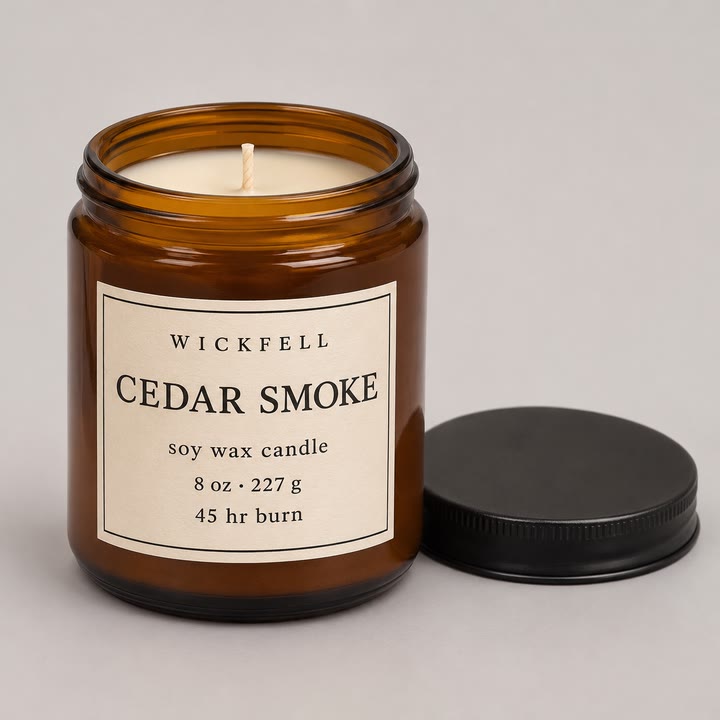
This is the size of a sensible first exercise: 15 seconds, two generated shots and an end card. Wickfell is a brand we made up, and the photo is ours. The person uploaded the photo and wrote one sentence: “Make a 15-second video ad for this candle.” The agent answered with its approach: “I'll plan the ad, then build a key image and rough animatic so you can see the direction before I generate any video.”
| Step | What was made | Credits | Minutes in |
|---|---|---|---|
| Plan | A written plan: the voiceover lines, a list of three shots, the on-screen copy and the sound | — | 0.3–1.1 |
| Key images | 5 key images: 2 for the flame close-up (the first was redone) and 3 for the room shot | 62.81 | 1.4–5.6 |
| Draft music | 1 music track | 13.50 | 3.3 |
| Voiceover | 5 voice clips; the narration was cut from four lines to three to fit 15 seconds | 3.88 | 6.5–6.8 |
| End card and text | The closing card, built on the uploaded photo, and the text overlays, drawn by code | 0.00 | — |
| Animatic | The key images with slow camera moves, the voiceover and the draft music, sent for approval | 0.00 | 7.5 |
| Approval | The person replied “Looks good, go ahead” | — | 7.9 |
| Two shots | 2 image-to-video shots, 5 seconds each at 1080p; each accepted on its first take | 320.00 | 8.5–9.0 |
| Edit, mix, check | Hard cuts, the mix at −15.6 LUFS, and the narration checked by transcription | 0.02 | 10.5–11.6 |
| Agent model | The agent's own reasoning and writing, both rounds | 6.86 | — |
| Total | $4.07 (407.07 credits) and 11.57 minutes of agent working time | ||
Round 1, the plan and the animatic, cost $0.84 (84 credits) and took 7.5 minutes; the person replied “Looks good, go ahead”. Round 2, the film, cost $3.23 (323 credits) and took 4.1 minutes. “Minutes in” counts from the request.
 Redone: the blank label sits under the copy
 Used: reframed so the label is out of shot
 Not used: blank label
 Not used: label turned away
 Used: label facing the camera

Only then were the two shots generated, 5 seconds each at 1080p; each was used on its first take. In the edit the agent tried a dissolve and dropped it: “The dissolve double-exposes the jar — keeping the hard cut.” The end card is the uploaded photo itself, so its label is exact.



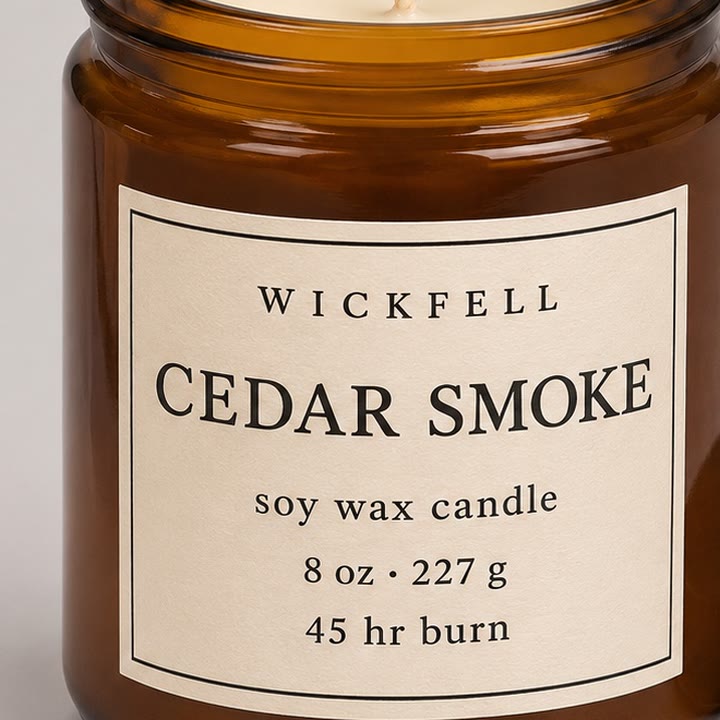 In the uploaded photo
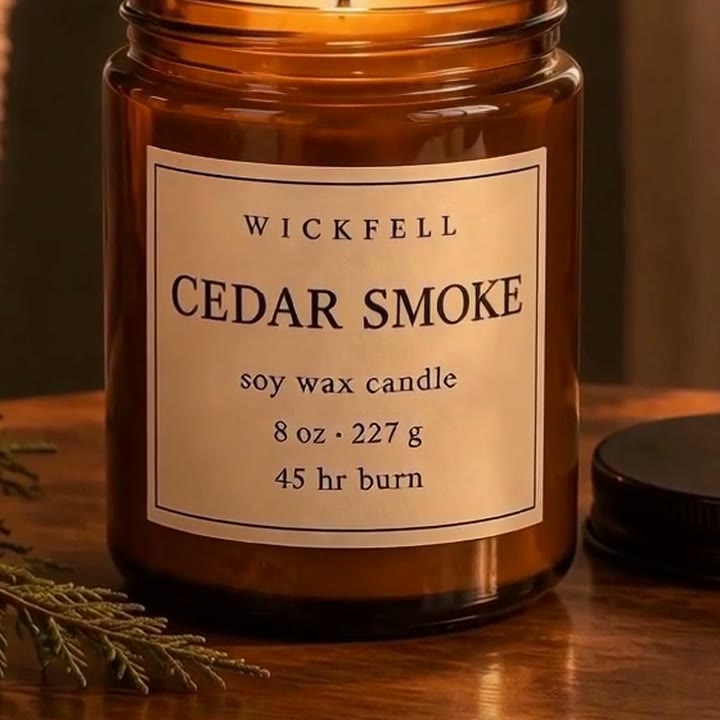 In a generated shot
An 87-second film with two characters, from a written brief
Friday at Five is a brand story for our own About page, made from a 776-character written brief with no files attached. It took one round; nobody asked for changes. This is the whole brief:
Create a new 60–90 second brand story film for Vividemo’s About page: https://vividemo.com/about
Our belief is that people should be able to create work they care about and still have time for life. Vividemo handles the time-consuming production work while users keep control of their story, taste, and creative decisions.
Tell a relatable, warm, beautifully crafted story that brings this belief to life. You decide the concept, characters, visual style, and sound. Avoid feature lists and generic advertising slogans.
Create all visuals and audio from scratch—do not reuse any existing video materials. Deliver a finished English-language film in 16:9, at least 1080p, with complete sound, a Vividemo end card, English SRT subtitles if applicable, and a website cover image.
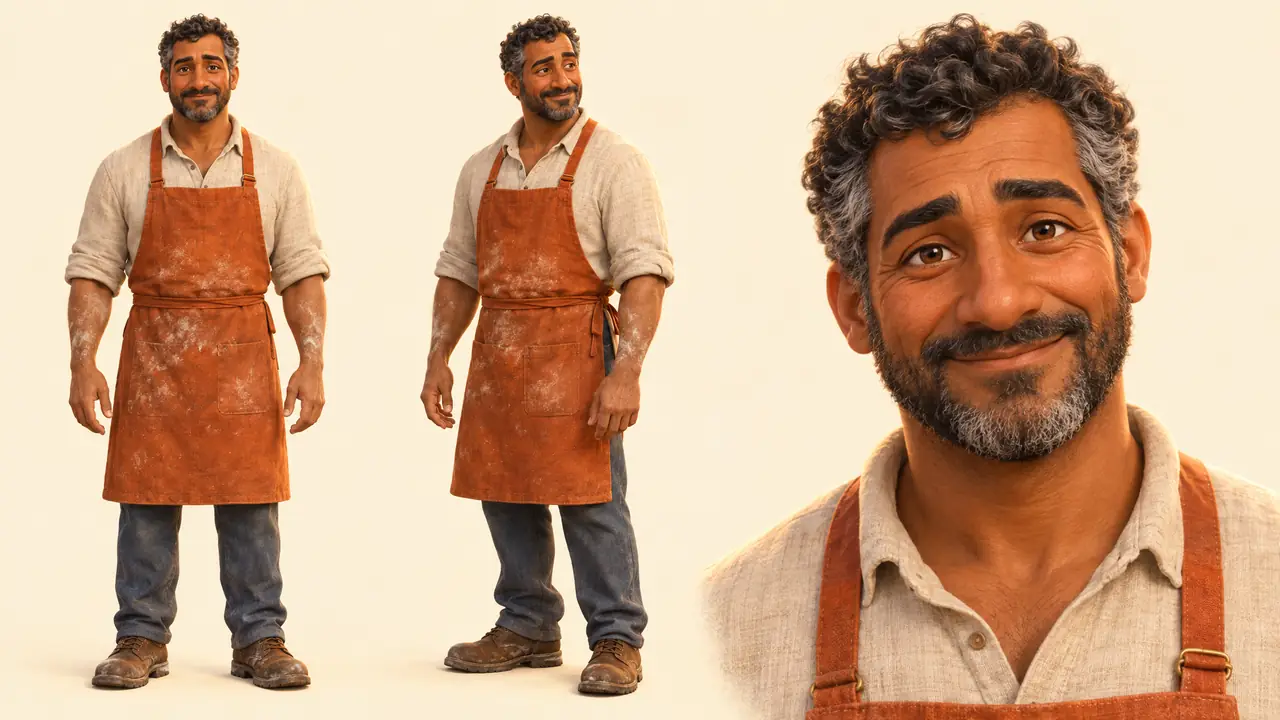
Going from 15 seconds to 87 changes the work: 12 shots instead of 2, a baker and his daughter who must look the same in every one, narration across the whole film, and a score that has to fit the cut.
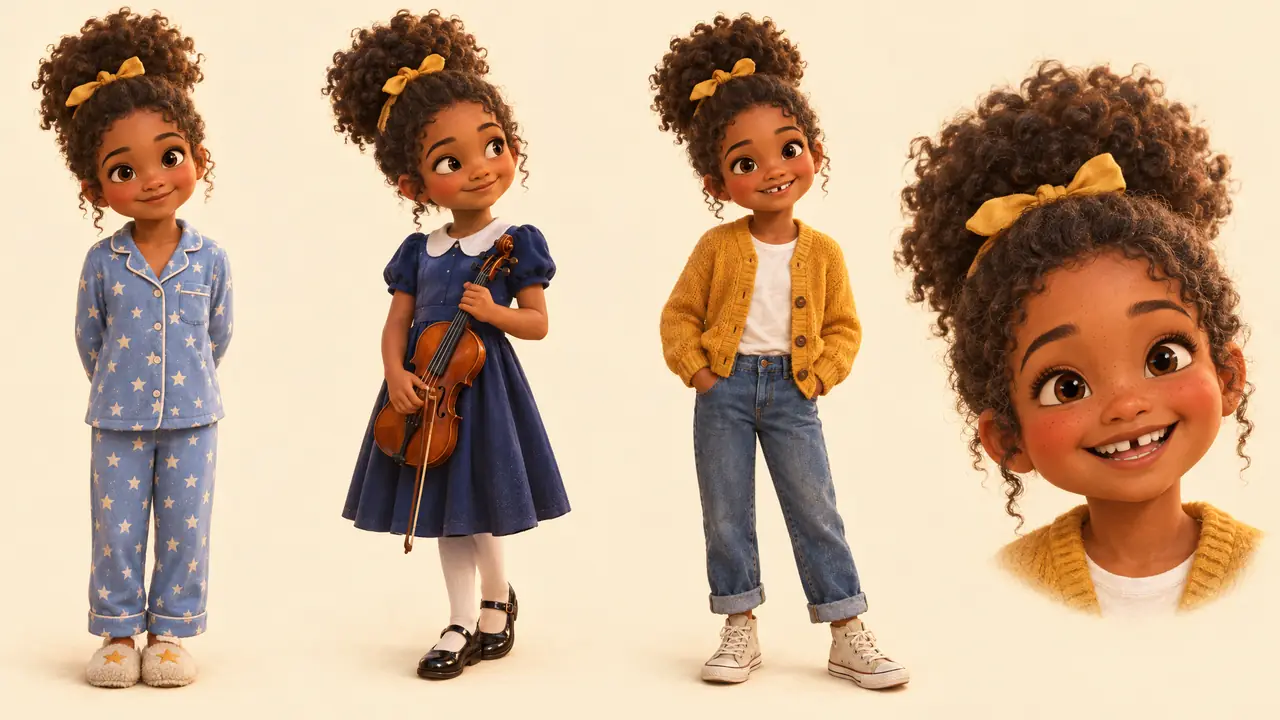
| Step | What was made | Minutes in |
|---|---|---|
| Plan and script | A plan and the script, after a look at Vividemo's About page | 0.2–2.6 |
| Character sheets | 2 character sheets, one for the baker and one for his daughter | 3.2 |
| Voice auditions | 3 trial voices for the narrator; one was chosen | 3.9–4.0 |
| Key images | 12 key images, one per shot | 4.2–5.9 |
| Contact sheet | All 12 key images checked side by side; 1 redrawn because a figure was duplicated | 8.0–8.9 |
| Twelve shots | 12 image-to-video shots at 1080p, each generated once and used | 10.2–13.9 |
| Narration | The narration, line by line, in the chosen voice | 14.9–15.2 |
| Score | 3 music takes: one spoke the section directions aloud, one faded out at 54 seconds, and the third was used | 16.2–17.4 |
| Edit, mix, check | The cut, the end card and the mix; the first edit's audio ended at 81.5 seconds and was recut; the narration was checked by transcription | ≈17.5–23.3 |
| Subtitles and cover | English SRT subtitles and a cover image | 23.6–24.7 |
| Total | $37.57 (3,757.08 credits) and 26.20 minutes of agent working time | |
The agent checked the key images together before animating any of them: “Making a contact sheet to check all keyframes together.” It checked the sound by transcribing the narration against the script and measuring the loudness.
An 88-second explainer with no generated footage, from a PDF
This one used no video model and no image model; the ledger has no charge for either. The input was one chapter of an OECD survey report, a 14-page PDF, with a written request of about 600 words. The agent wrote the narration, generated the voice and the music, and drew the charts and illustrations as animated graphics.
The first version was 88 seconds long, cost $1.40 (140 credits) and took about 46 minutes of agent working time. Friday at Five is almost the same length and cost $37.57. Without generated footage there is no per-second video charge, and the money goes to the music, the agent's own work and the voice. It didn't take less time, though: about 46 minutes against 26.
Two more rounds followed: a second cut with about 29 seconds of licensed stock footage, and a revision from 16 timestamped notes. The three rounds came to $3.70 (370 credits). The film, the request and its nine statistics checked against the report are on its case study page.
What went wrong, and what the fix cost
Two problems from our own test projects show what to look for.
- A claim that wasn't on the label. We gave the same photo and sentence as the Wickfell ad to the agent running a different model. Its plan added the line “Hand-poured soy wax”, which isn't on the label. The person approved the plan without noticing and corrected it only after the film was made: “The candle isn't hand-poured.” The fix changed one caption line and cost $1.24 (124 credits) and 1.6 minutes of agent working time; a frame comparison confirmed nothing else changed. The lesson: check every claim in a plan against the source before you approve it.
- Music that read out its instructions. In 4 of the 15 projects that used generated music, a music take sang or spoke the written section directions. Those takes were discarded and regenerated; Friday at Five was one of them. Listen to every music take before it goes into the mix.
How long it takes
Time on an AI video splits into four parts that are easy to confuse.
- Agent working time. Across our 22 test projects (November 11–16, 2026), the agent's working time to a first version had a median of about 20 minutes, ranging from 6 to 69 (n=22). It is the sum of each round's run time and leaves out queueing and the person's own time.
- Waiting. Wall-clock time from the first message to the first version had a median of about 26 minutes (range 8.7–85, n=22). It includes queueing and waiting for the person; the longest project spent five rounds approving its story, characters and key images first.
- Human review. We didn't measure the person's own time. The Wickfell animatic was approved 18 seconds after it arrived; quick isn't always careful, as the plan approved with a claim not on the label shows.
- Rework. 14 of the 22 projects had no revision round, 5 had one and 3 had two. A revision round cost a median 38.5% of the credits of the version it changed (range 11.6%–101.7%, n=11 rounds).
Video model makers don't publish how long a generation takes: none of the model pages we read gives a time in seconds, and Alibaba Cloud says only that Wan 3.0 Prime delivers “significantly faster generation speed.” For images, OpenAI's image generation guide says “Complex prompts may take up to 2 minutes to process.”
Times from forums include learning and retakes. One creator in a thread on r/aitubers said a 2-minute animated video took about 16 hours, counting prompts, failed image-to-video attempts, editing, sound fixes and choosing music, while still learning to edit. That is one person's account, not a benchmark.
What it costs, and where the money goes
The cost of an AI video is mostly the cost of the seconds you generate:
Shots × seconds per shot × takes per shot × price per second, plus images, voice and music.
For example, 12 shots of 5 seconds, two takes each, at $0.20 per second is $24 of video. Takes per shot is the number nobody publishes. In our two walkthroughs with generated footage, all 14 shots were used on their first take, but that's two projects, so allow for more.
One count from another maker: Higgsfield's own video on making an ad (uploaded June 23, 2026) closes with an on-screen total of 56 generations and 6,725 credits for an ad of about 45 seconds with five scenes, a song, dialogue and sound effects. At the list prices on Higgsfield's pricing page on November 17, 2026, that is about $280–$331 depending on the plan, and less at that day's promotional prices. It is a different film made a different way, not a like-for-like comparison with ours.
Official prices per second
The makers' own API or list prices per second of video; resellers and consumer plans charge differently.
| Model | Per second | Resolution | Source |
|---|---|---|---|
| Seedance 2.5BytePlus's example: $2.843 for a 5-second 16:9 clip with no video input; billed in tokens | $0.569 | 1080p | BytePlus ModelArk pricing |
| Seedance 2.0BytePlus's example: $1.87 for a 5-second clip | $0.37 | 1080p | BytePlus ModelArk pricing |
| Kling 4.01.5 units per second; the smallest prepaid Flagship package is $500 for 3,250 units | ≈ $0.23 | 1080p | Kling AI API pricing |
| Kling 3.0Without / with audio: 0.8 and 1.2 units per second at $0.14 per unit (Standard package) | ≈ $0.112 / $0.168 | 1080p | Kling AI API pricing |
| Wan 3.0$0.20 in the Singapore region and $0.165 in the other regions listed; list price before promotions | $0.165 or $0.20 | 1080p | Alibaba Cloud Wan 3.0 model page |
| Gemini Omni 1.2 FlashAbout $0.07 per second at 720p; billed in tokens | ≈ $0.104 | 1080p, upsampled | Gemini API pricing |
| LTX-2.5 Pro / FastBilled per second, no request fees | $0.17 / $0.13 | 1080p | LTX API pricing |
| FLUX 3 VideoFrom text or an image | $0.24 | FHD (1080p) | Black Forest Labs pricing |
| MiniMax H3$0.08 per second at 768p; no 1080p price | $0.13 | 2K | MiniMax video pricing |
| Runway Gen-4.512 credits per second at $0.01 per credit | $0.12 | 720p only | Runway API pricing |
Two prices don't fit the table. Google Cloud's generative AI pricing lists Veo 3.1 with audio at “$0.40 / 1 count” for 720p and 1080p without saying what a count is. Luma prices Ray3.2 in plan credits: 400 for 5 seconds at 1080p and 1,200 for 10 seconds, or $1.20 and $3.60 at the Plus plan's $30 for 10,000 credits.
What our test projects cost
Across our 22 test projects, cost depended mostly on whether a project generated footage. With generated footage, the first version cost a median of $25.79 per finished minute, or 42.98 credits per finished second (range 4.13–63.66, n=11). Without it (motion graphics, animated stills and rendered text), the median was $1.06 per finished minute, or 1.76 credits per finished second (range 0.75–8.95, n=11). Generated footage in these projects came mainly from two video models at 1080p.
Where the money goes
In the 11 projects with generated footage, credits went as shown below. This counts every round of each project, including revisions and variants; the per-second medians above count only up to the first version.
Generating video was the largest item: 63.1% of all credits in those 11 projects and 58.6% across all 22, including the 11 that generated none. In the Wickfell ad and Friday at Five it was 78.6% and 69.0%. The ledger includes charged takes that weren't used; failed generations that weren't charged aren't in it.
For what studios, agencies and freelancers charge for the same kinds of video, see our explainer video cost guide and commercial production cost guide.
Writing prompts that work
The official guides agree on the parts of a video prompt: the subject, its action, the place and time, the camera's framing and movement, the light and style, and, for models with sound, the audio. Runway's structure is “[Camera] shot of [a subject/object] [action] in [environment]. [Supporting component descriptions]” (Runway's text to video prompting guide). Google's Veo 3.1 formula is “[Cinematography] + [Subject] + [Action] + [Context] + [Style & Ambiance]” (Google Cloud's Veo 3.1 prompting guide). BytePlus asks for a one-sentence summary, then a shot-by-shot description, then notes on what must stay the same (BytePlus's Seedance 2.5 prompt guide). Alibaba's basic formula for Wan is “Prompt = Entity + Scene + Motion” (Alibaba Cloud's Wan prompt guide).
Image-to-video prompts describe the motion only
When a shot starts from your image, the image already carries the look. Runway's image to video prompting guide: “Effective image to video prompts focus almost exclusively on motion.” Its structure is “The camera [motion description] as the subject [action]. [Additional descriptions]”; Alibaba's is “Prompt = Motion + Camera movement” (Alibaba Cloud's Wan prompt guide).
A real pair: one shot's image prompt and motion prompt
These are the prompts the agent wrote for the flame close-up in the Wickfell ad, copied from the project. The image prompt went to an image model with the uploaded photo as a reference, and made the key image marked “Used” in the walkthrough. The motion prompt then went to a video model with that key image.
Image prompt: Extreme close-up photograph of a lit soy wax candle in an amber glass jar, camera just above the jar rim looking slightly down at the wax surface. The frame is filled by the cream wax pool, the single burning cotton wick and the glowing amber glass rim, with a thin wisp of pale smoke rising into the dark warm background. The bottom third of the frame falls away into soft dark shadow below the jar rim; no paper label is visible anywhere. Warm low-key evening light from the left, cinematic macro still life, shallow depth of field, subtle film grain, 85mm macro lens look, vertical composition, flame and rim centered slightly high in frame. No text, no hands, no people.
Motion prompt: Live-action, cinematic macro still life. The lit soy wax candle in the amber glass jar from <Picture 1> stays exactly in place, preserving the jar rim, the cream wax pool, the charred wick, the amber reflections and the dark warm background. The flame flickers gently and continuously, its glow breathing across the melted wax and the glass rim, and a thin ribbon of pale smoke lifts from the flame and drifts upward, curling and dissolving near the top of the frame. The camera pushes in with small amplitude at slow speed toward the flame, keeping the wick and the jar rim inside the frame. Toward the end of the shot the flame settles into a steady burn and the last of the smoke thins out.
Sound, in the same prompt: A very quiet room tone with the faint soft flicker of a candle flame and a barely audible hiss at the wick.
The image prompt sets the look: the subject, the framing, the light, the lens and what must not appear. The motion prompt gives the style one phrase and spends the rest on the shot: what must stay as it is in the image, what moves, how the camera moves and how the shot ends. We left out the video model's formatting tags; “<Picture 1>” is how the prompt refers to the key image.
Where the guides disagree
- Length. Runway: “There's no ideal prompt length” (Runway's text to video prompting guide). BytePlus's own Seedance examples run to several paragraphs (BytePlus's Seedance 2.5 prompt guide).
- Saying what you don't want. Google's Veo guide marks “using instructive language or words such as "no" or "don't"” as not recommended (Google Cloud's Veo prompt guide). BytePlus: “Negative constraints are supported for subtitles and audio control, such as "no subtitles" and "no BGM."” (BytePlus's Seedance 2.5 prompt guide).
- Dialogue. Google's Veo 3.1 guide puts lines in quotation marks: “A woman says, "We have to leave now."” Google Cloud's best-practice page suggests writing the line after a colon instead, so the model doesn't render it as subtitles.
A template
This template combines the parts the guides share. It is this guide's synthesis, not one maker's format.
From text: [Shot size and angle], [camera move]: [subject and what it looks like] [one action] in [place, time of day]. [Light], [style]. Audio: [ambience]; [character] says: [short line].
From an image: The camera [move] as [subject] [one action]. [What else moves]. Audio: [ambience or effects].
Change one thing at a time between takes, and refine at low resolution. Runway's advice: “generate at 720p while you refine, then upscale only the version you're keeping.”
Keeping things consistent, and why some videos look fake
“Consistency” covers four different things, and each goes wrong in its own way:
- Appearance: a character's face, hair, body and clothes; a product's shape and color.
- Voice: the same voice, accent and level from line to line.
- Visual style: the same color, light, lens and texture from shot to shot.
- Location and props: the same room, with the same objects in the same places.
Fidelity is a separate question: whether something you uploaded, such as a real product, a logo or an artwork, stays exactly as it is. Generation reinterprets what it sees, so when something must be exact, show the original: the Wickfell end card is the uploaded photo, so its label can't drift.
The usual fix for appearance is references: a sheet for each character or product, key images built from it, and a model that accepts several references. The limits by model:
| Model | References per generation |
|---|---|
| Seedance 2.5 | 50 references: 30 images, 10 videos and 10 audio clips |
| Kling 4.0 | Up to 10 images, 5 reference videos and 7 subject elements |
| Wan 3.0 | Up to 10 images, 5 videos and 5 audio clips |
| MiniMax H3 | Up to 9 images, 3 video clips and 3 audio clips |
| Gemini Omni 1.2 Flash | Up to 6 reference images |
Why some AI videos look fake
The makers name the weak points themselves.
- Runway, on Gen-4.5: “Causal reasoning: effects sometimes precede causes (e.g., a door opening before the handle is pressed). Object permanence: objects may disappear or appear unexpectedly across frames… Success bias: actions disproportionately succeed (e.g., a poorly aimed kick still scoring a goal).”
- ByteDance Seed, on Seedance 2.5: “there is still room for improvement, particularly regarding the physical plausibility of complex motions and the stability of scenes involving interactions among multiple subjects.”
- OpenAI, on its image model: “Text Rendering: Although significantly improved, the model can still struggle with precise text placement and clarity.” It also “may occasionally struggle to maintain visual consistency for recurring characters or brand elements across multiple generations.”
From the cheapest fix to the last resort:
| Problem | Try first | Then | Last resort, in the edit |
|---|---|---|---|
| A character's face, hair or clothes change between shots | Remake the key image from the reference sheet, with the same description | Use a model that takes more reference images, or give it the first and last frame | Cut away sooner, or use a wider shot where the face is small |
| A product's shape or label comes out wrong | Start the shot from a key image made from the real product photo | Ask for less motion, or frame the label out of shot | Show the real photo on the end card, as the Wickfell ad does |
| Text in the picture is misspelled | Don't ask the model for text | Remake the key image without text | Add text and logos as overlays in the edit |
| Subtitles you didn't ask for appear | Seedance: write “no subtitles”; Google: write the speech after a colon instead of in quotation marksBytePlus's Seedance 2.5 prompt guide and Google Cloud's video best practices | Generate the shot again | Crop, or cover them with your own captions |
| Motion breaks: objects pass through each other or appear from nowhere | One subject, one action and one camera move per shot | A shorter shot, or a different angle | Cut before the problem; a shot rarely needs every generated second |
| It looks fake: waxy skin, flat light, floaty motion | Describe a real camera, lens and light in the key image | Generate from a realistic key image instead of from text | Match color, and add real ambience and grain, in the edit |
Sound: native audio or separate tracks
Sound comes one of two ways. Many current video models generate it with the picture: Kling 4.0 outputs “Two-channel stereo,” Seedance 2.5 is an “audio-video joint generation model,” and MiniMax H3 outputs 32 kHz stereo. Others don't say: Runway's Gen-4.5 help page doesn't mention audio, and Luma's pricing page shows a dash in the audio column for Ray3.2.
Native audio suits dialogue and effects that must match the action. Separate tracks are easier to control: you can fix one line without touching the picture, and set the music under the voice. Both walkthroughs used separate narration and music tracks; the Wickfell shots' own audio was silent.
Voices and consent
Cloning a real person's voice needs their permission. ElevenLabs' Prohibited Use Policy prohibits “Cloning, synthesizing, or impersonating the voice, identity, or likeness of any living individual without their explicit and informed consent or other valid authorization.”
Music rights depend on the plan
Check the plan before you publish generated music. Suno says songs made on its free plan “are only available for non-commercial use and cannot be monetized,” and that subscribing later “will not give you a retroactive license for the song.” ElevenLabs lists “Commercial use licensing on Starter+ plans” for its music API. Udio says that since its partnership with Universal Music Group, “downloading of audio, video, and stems has been disabled.”
Loudness
Spotify normalizes playback to “-14 dB LUFS” and recommends keeping true peaks below −1 dBTP (Spotify for Artists: Loudness normalization); European broadcast uses −23 LUFS under EBU R 128. YouTube's upload encoding page gives the audio codecs and sample rate but no loudness target. Our Wickfell ad was mixed to −15.6 LUFS.
Editing and exporting for each platform
Generated clips rarely arrive in order or at the right length, so the edit is where the video takes shape: trim each clip to its best seconds, cut on action, add captions and text as overlays, mix, and export one version per platform. These are the platforms' own specs:
| Platform | Length | Shape | Also |
|---|---|---|---|
| YouTubeYouTube's recommended upload encoding settings | — | 16:9 is standard on a computer | MP4; H.264; AAC-LC or Opus audio at 48 kHz; upload at the frame rate you made it; 8 Mbps for 1080p SDR at 24–30 fps |
| YouTube ShortsYouTube Help: Shorts length and YouTube Help: Upload YouTube Shorts | Up to 3 minutes | Square or vertical | No resolution or frame rate on the help pages |
| Instagram ReelsInstagram Help: Reels length and Instagram Help: Reels specs | Up to 20 minutes; “Reels over 3 minutes won't be recommended to new audiences” | 1.91:1 to 9:16 | At least 30 fps and 720 pixels |
| TikTok ads (In-Feed)TikTok Ads video specifications | Up to 10 minutes | 9:16 recommended, at least 540×960; 16:9 and 1:1 accepted | Up to 500 MB; safe-zone templates show where text stays clear of the app's buttons |
| LinkedIn video adsLinkedIn video ad specifications | 3 seconds to 30 minutes; 15–30 seconds recommended | 4:5 recommended at 720×900; 16:9, 1:1 and 9:16 accepted; nothing wider than 16:9 | MP4; frame rate below 30 fps; captions as SRT |
Types of AI video tools, and how to choose a model
Four terms get used loosely. In this guide they mean:
- AI video generator
- A model or tool that turns text, images or other references into a new clip, usually a few seconds long.
- AI video editor
- A tool that changes existing video, on a timeline or by regenerating parts of a clip, such as restyling it or replacing an object.
- AI video agent
- A system that takes a brief, plans the steps, calls models for each one and delivers an edited video, with points where a person approves or asks for changes.
- AI avatar tool
- A tool built around a generated presenter who reads your script, usually for training and explainer videos.
The lines blur: some models both generate and edit, and agents call generators.
How to choose a model
There is no single best model. Choose by what the video needs, and look at what backs each choice: independent blind-vote leaderboards, official specs, or only vendor claims and opinion:
| Need | Models to consider | Evidence |
|---|---|---|
| Characters who talk, with lip movement made by the model | Seedance 2.5, Gemini Omni 1.2 Flash | Independent blind-vote leaderboardsNo independent data for dialogue in languages other than English. |
| Realistic people | Seedance 2.5, Wan 3.0, MiniMax H3 | Independent blind-vote leaderboardsSeedance 2.5 doesn't accept reference images or videos of real faces. BytePlus Seedance 2.5 documentation |
| Editing or restyling footage you already have | Wan 3.0, Gemini Omni 1.2 Flash, Seedance 2.5 | Independent blind-vote leaderboardsThe three leaderboards agree on this group. |
| Animated and stylized looks | Wan 3.0, Gemini Omni 1.2 Flash (from text); Seedance 2.5 (from an image) | Independent blind-vote leaderboardsMost test prompts are realistic, so the sample is smaller. |
| One long continuous shot | Kling 4.0, Seedance 2.5, Wan 3.0 (30 seconds); Luma Ray3.2 (20 seconds) | Official specs onlyLeaderboards test clips of about 10 seconds. |
| Native 4K | Veo 3.1, Seedance 2.5, LTX-2.5, FLUX 3 Video | Official specs onlyLeaderboards play everything at 1080p. |
| A cheap draft first, then the final | Seedance 2.5, FLUX 3 Video, Gemini Omni, MiniMax H3 | Official specs onlyOnly Black Forest Labs says the final keeps the same shot. Black Forest Labs' FLUX 3 documentation |
| A product that must not change shape or label | Any image-to-video model, starting from a key image made from the product photo | Vendor claims and opinion onlyLeaderboards rate how a clip looks, not whether it matches the real product. |
| The same character across many shots | Models that take more reference images (see the list above) | Vendor claims and opinion onlyNo independent benchmark tests this across clips for current models. |
| Lip sync to audio you already have, or an avatar presenter | Dedicated lip-sync and avatar products | Vendor claims and opinion onlyPublished comparisons disagree, and some are sponsored. |
| Text and logos on screen | Don't generate them; add them in the edit | Vendor claims and opinion onlyOpenAI's image guide says its model can still struggle with precise text placement. OpenAI's image generation guide |
On November 17, 2026, three public leaderboards that rank video models by blind votes each had a different model in first place: Artificial Analysis (also its image-to-video board), arena.ai and OpenArt. Ranks move month to month and differ between text-to-video and image-to-video, so we link the boards instead of printing them. Some current models, such as Kling 4.0, were on none of the three.
Two rules can decide for you: “Seedance 2.5 series does not support directly uploading reference images or videos containing real human faces” (BytePlus Seedance 2.5 documentation), and Google lists English as the only prompt language for Veo 3.1.
Rules before you publish
This section summarizes official pages as we read them on November 17, 2026. It is not legal advice, and rules change: check each platform's own page before you publish.
Labels on each platform
- YouTube requires creators to disclose “AI-generated or altered content that seems realistic”: a real person appearing to say or do something they didn't, altered footage of a real event or place, a realistic scene that didn't occur, or music that's the main focus of the video. Non-realistic content and minor edits are exempt, and “Disclosing AI content alone won't limit a video's audience or impact its eligibility to earn money.” YouTube may also label content itself, for example when it carries C2PA metadata (YouTube Help).
- TikTok requires creators “to label all AI-generated content that contains realistic images, audio, and video,” and labels content itself when it was made with TikTok AI effects or carries Content Credentials; that label can't be removed. Labeling “won't affect the distribution of your video as long as it doesn't violate our Community Guidelines” (TikTok Help). Under guidelines effective September 24, 2026, “Unlabeled content may be removed, restricted, or labeled by our team”; color correction, cropping, art styles such as anime and generic text-to-speech need no label (Community Guidelines).
- Meta (Facebook, Instagram, Threads) requires a label on content with “photorealistic video or realistic-sounding audio that has been digitally generated or altered”; images don't need one. The label reads “AI content”, and you add it with the “Add AI label” setting when you post. “There may be penalties if you do not label content as required” (Instagram Help).
- Vimeo: “We require that creators disclose when realistic videos are created with altered or synthetic media, including generative AI.” Its examples include cloned voices used for a voiceover (Vimeo Help).
- LinkedIn sets no labeling duty for creators on the page we found. Content signed with C2PA Content Credentials shows a C2PA icon, a feature LinkedIn is “gradually making … available” (LinkedIn Help).
- X has no general labeling rule; its authenticity policy covers media “shared as authentic but is significantly and deceptively altered, manipulated, or fabricated” in harmful ways. Since March 3, 2026, creators who post AI-generated videos of an armed conflict without a disclosure lose Creator Revenue Sharing for 90 days (X Help).
Monetization on YouTube
On July 15, 2025, YouTube renamed its “repetitious content” policy “inauthentic content.” Its monetization policy gives “using AI to visualize a unique character and narrative you invented” as an example that can earn money, and rules out “AI-generated content made with generic or unoriginal templates giving the impression of mass production” and AI personas giving information on health, legal issues, finances or politics. TikTok's Creator Rewards page doesn't mention AI; it asks for original content “designed, filmed, and produced by you.”
Copyright
In the US, purely AI-generated material isn't protected by copyright. The US Copyright Office's report (January 29, 2025) says “Copyright does not extend to purely AI-generated material, or material where there is insufficient human control over the expressive elements,” and “prompts do not alone provide sufficient control.” Your own contributions, such as a script you wrote, the creative selection and arrangement of the material, or creative changes you make to it, can be protected. In Thaler v. Perlmutter, the D.C. Circuit held on March 18, 2025 that the Copyright Act requires a work to be authored “in the first instance by a human being,” and the Supreme Court denied review on March 2, 2026 (Supreme Court docket 25-449).
The makers generally don't claim what you generate: OpenAI says you “own the Output”; Runway “does not claim ownership” of inputs or outputs, and may use them to train its models; BytePlus, Alibaba Cloud and MiniMax say the same in their own words. Plans still matter: Midjourney requires a company with more than $1,000,000 a year in revenue to be on a Pro or Mega plan to own its assets, and Pika's free plan has no commercial license.
Likeness and voice
In the US, the TAKE IT DOWN Act, Public Law 119-12 (approved May 19, 2025) covers AI-made intimate images of an identifiable person: covered platforms had a year to set up a process, and must remove such an image within 48 hours of a valid request. The NO FAKES Act, which would create a federal right over a person's digital replica, was placed on the Senate calendar on June 24, 2026 and was not law on November 17, 2026 (S.4591 on Congress.gov). For reviews and testimonials, the FTC rule on consumer reviews and testimonials, effective October 21, 2024, says “AI-generated reviews are covered by the final rule.” Vendor terms add their own limits, such as the ElevenLabs rule quoted under Sound.
The EU AI Act
Article 50 of the EU AI Act applies from August 2, 2026. Anyone using AI professionally to make a deep fake, content that “resembles existing persons, objects, places, entities or events and would falsely appear to a person to be authentic or truthful,” must disclose it; for evidently artistic, creative, satirical or fictional work, disclosure is limited to “an appropriate manner that does not hamper the display or enjoyment of the work.” Personal, non-professional use is outside it. Makers of AI systems must mark output in a machine-readable way; systems on the market before August 2, 2026 have until December 2, 2026 under Regulation (EU) 2026/1744. Fines go up to €15 million or, for a company, 3% of worldwide annual turnover. The Commission's voluntary code of practice covers marking and labeling.
The UK
The UK government's report on copyright and AI (March 18, 2026) says “There are no obligations in the UK for AI-generated content to be labelled” and proposes working with industry on best practice. For ads within its scope, the Advertising Standards Authority says “our rules will apply, regardless of how the ad was created.”
Ads made with AI
TikTok's ad policy allows AI-generated or heavily edited content if it carries the AIGC label or your own clear disclaimer, and that includes completely AI-generated images, video and audio: “If we identify AI-generated content that has not been disclosed, your ad will be rejected or restricted.” It doesn't allow content that misuses a public figure's likeness without permission. Videos exported from TikTok's own Symphony avatar tool are labeled automatically (TikTok Ads Help).
Meta requires advertisers to disclose AI in ads about social issues, elections or politics, rejects such ads that should have disclosed and didn't, and shows “AI info” near “Paid for by” (Meta's policy). In other ads, Meta adds an AI info label when you use its own generative tools, and advertisers can disclose voluntarily in “the European Region, California, New York, India and Taiwan” (Meta Business Help). Meta's official pages have no specific rule on AI-made UGC-style ads or AI testimonials; its general rules ban unauthorized endorsements, product misrepresentation and celebrity bait (prohibited commercial practices).
How AI video models work
Most current video models are diffusion models. They start from random noise and remove it step by step until frames appear, steered by your prompt and any images you give them. To keep that affordable, they work on a compressed form of the video, called a latent space, and a decoder turns the result into frames. A transformer relates each part of each frame to the rest across space and time, which keeps objects and motion consistent through a clip. Models that also make sound generate the audio with the picture, so speech can line up with lips.
For a longer explanation, read MIT Technology Review's “How do AI models generate videos?” (September 12, 2025) and Runway's “How does AI video generation work?” (August 20, 2026).
Glossary
Short definitions of the terms in this guide. Each term has its own link.
- Text-to-video
- Making a clip from a written prompt alone.
- Image-to-video
- Making a clip that starts from an image you supply; the prompt describes the motion.
- Reference image
- An image the model uses to keep a character, product, place or style the same, without using it as a frame.
- Reference sheet (character sheet)
- One image showing a character, product or place from several angles, made to keep it consistent across shots.
- Key image (key frame)
- A still made for one shot before it is animated; it fixes the composition, light and look.
- First and last frame
- Giving the model the opening and closing image of a shot and letting it make the motion in between.
- Shot
- One continuous piece of video between two cuts.
- Take
- One generation of a shot; you can make several and keep the best.
- Shot list
- The numbered list of shots with the length, framing and action of each.
- Script
- The narration or dialogue and the action, written before anything is generated.
- Animatic
- The key images timed to the voice and music with simple camera moves, used to check the direction and pacing before paying for video.
- Contact sheet
- All the key images on one page, so they can be compared at a glance.
- Prompt
- The written instruction you give a model.
- Negative prompt
- A description of what you don't want; some models take it in a separate field, others in the prompt.
- Extend
- Generating more seconds that continue from the end of a clip.
- Upscaling
- Making a higher-resolution version of a clip you already have.
- Native audio
- Dialogue, effects and ambience made by the video model in the same generation as the picture.
- Lip sync
- Mouth movement that matches the speech.
- Voiceover (narration)
- A voice heard over the picture rather than spoken by someone on screen.
- Text-to-speech (TTS)
- Turning written text into a spoken voice.
- Voice clone
- A synthetic voice made from recordings of a real person.
- Score (music bed)
- Music written for the video; a bed sits quietly under the narration.
- Sound effects (SFX)
- Sounds tied to something on screen, such as a door or footsteps.
- Ambience
- The background sound of a place, such as a street or a kitchen.
- Mix
- Balancing voice, music and effects into one soundtrack.
- LUFS
- The unit for perceived loudness, used to set the level of a finished soundtrack.
- Hard cut
- Going straight from one shot to the next with no transition.
- Dissolve
- A transition in which one shot fades through the next.
- End card
- The closing frame of a video, usually with the logo, the product and what to do next.
- Captions (subtitles)
- The words that are spoken, shown as text; SRT is a common caption file format.
- Aspect ratio
- Width to height: 16:9 is horizontal, 9:16 vertical, 1:1 square and 4:5 a tall rectangle.
- Resolution
- The size of the picture in pixels; 1080p is 1920×1080 in 16:9.
- Frame rate (fps)
- How many frames are shown per second, such as 24 or 30.
- Close-up and wide shot
- Shot sizes: a close-up fills the frame with a face or object; a wide shot shows the whole scene.
- Push-in, pan and orbit
- Camera moves: a push-in goes toward the subject, a pan turns sideways, an orbit circles the subject.
- Diffusion model
- A model that makes images or video by removing noise step by step, guided by the prompt.
- Latent space
- The compressed form a model works in before a decoder turns the result into frames.
- Credits
- A platform's billing unit, usually charged per second of video at a given resolution.
- AI label
- A platform's mark that content was made or changed with AI, added by the creator or automatically.
- C2PA (Content Credentials)
- A standard for attaching a file's origin and edit history as metadata, which some platforms read to label AI content.
- Deepfake
- Realistic generated media that shows a real person saying or doing something they didn't.
- AI avatar
- A generated presenter who speaks a script on screen.
FAQ
Is it easy to make AI videos?
A single clip is easy: type a prompt or upload an image, and a model returns a few seconds of video. A finished video with characters, a product or dialogue takes more steps: a script, reference and key images, several shots, sound and an edit. See the workflow, step by step.
Can I use ChatGPT to make videos?
Not with Sora: OpenAI discontinued the Sora web and app on April 26, 2026 and shut down the Sora API on September 24, 2026. A chat assistant can still write the script, the shot list and the prompts; the clips come from a video model. See which way to make it.
How long do AI videos take to make?
In our 22 test projects (November 2026), the agent's working time to a first version had a median of about 20 minutes, and the wall-clock time from the first message a median of about 26 minutes. Video model makers don't publish generation times. See how long it takes.
How much does it cost to make a 10 minute AI video?
Multiply it out: 600 seconds at the official 1080p prices in our table ($0.104 to $0.569 per second on November 17, 2026) is about $62 to $341 for one take of every second, before extra takes, images, voice and music. We haven't made a 10-minute video, so we have no measured figure. See what it costs.
Is making an AI video free?
Some tools let you try for free, but video generation is priced per second, and free plans can limit how you use the result: Suno's free plan is for non-commercial use only, and Pika's free plan has no commercial license. See what it costs.
What is the longest AI video you can make?
One generation is short: on November 17, 2026 the longest single take we found was 30 seconds, from Kling 4.0, Seedance 2.5 and Wan 3.0. Longer films are many shots cut together, so length has no fixed limit. See the longest take by model.
How can I turn an image into a video using AI?
Upload the image to an image-to-video model and describe only the motion: what moves, and how the camera moves. The image already sets the composition, subject, light and style. See writing prompts that work for a template.
Which AI video generator is best for character consistency?
No independent benchmark compares current models on this, so choose by method: a reference sheet of the character, each shot's key image built from it, and a model that takes several reference images (6 to 30 on November 17, 2026). See keeping things consistent.
How do they make AI videos look so real?
They start each shot from a realistic key image, give it one clear action, describe a real camera and light, and keep the best take. The edit does the rest: cutting before a clip goes wrong, adding real sound and matching color. See why some videos look fake.
Is it illegal to use AI to make videos?
The rules we found regulate what a video shows and how it is labeled, not the use of AI itself: the EU AI Act requires deep fakes to be disclosed from August 2, 2026, and the US TAKE IT DOWN Act covers AI-made intimate images of real people. See rules before you publish.
Can YouTube detect AI-generated content?
YouTube says it may label content automatically when it was made with YouTube's own AI tools, carries C2PA metadata, or is detected by its internal systems as AI-generated or altered. Creators must still disclose realistic AI content when they upload. See the label rules.
Will YouTube let you monetize AI videos?
Yes, if it's original. YouTube's monetization policy lists using AI to visualize a unique character and narrative you invented as content that can earn money, and excludes mass-produced, repetitive content. See rules before you publish.
How are people making those AI videos on TikTok?
The steps are the same as for any AI video; the format changes: vertical 9:16, a voice or music track, and text kept clear of the app's buttons. TikTok asks creators to label realistic AI content, and labels some content itself. See editing and exporting for each platform.
Can I sue someone for making an AI video of me?
It depends on where you live and what the video shows, so ask a lawyer. In the US, the TAKE IT DOWN Act requires covered platforms to remove AI-made intimate images of an identifiable person within 48 hours of a valid request; the NO FAKES Act, which would create a wider right over your digital replica, was not law on November 17, 2026. See rules before you publish.
Method, data and changelog
Our test projects
The data comes from 22 test projects made on Vividemo's staging environment by our own team in November 2026, each brief run once, at November 2026 prices. Credits are ledger charges; “agent working time” is the sum of each round's run time and excludes queueing and the person's own time. Charged takes that were not used are included; failed generations that were not charged are not in the ledger.
The projects ran from November 11–16, 2026: product ads, brand stories, animated shorts, explainers, training videos, logo animations and text animation, made from one-line requests, written briefs, photos, PDFs and product page links. With a handful of each kind, we don't publish medians by kind; the CSV lists every project.
Cost per finished second is a project's credits up to its first version divided by that version's length; the medians are across projects. “With generated footage” means a project generated video or avatar clips in any round. One training project added a presenter only in a later round, so its first version is the low end of that group's range, 4.13 credits per second. Shares of credits by category are sums across projects, not medians of each project's share. For one project, some agent-model and image charges are missing from the ledger, so its credits are understated; the CSV flags it.
Dollar figures convert credits at the base rate of 100 credits per $1. In the text, credits are rounded to whole numbers and times to two significant figures; the step tables, the charts and the CSV carry the values as recorded.
Facts from other sources
Every price, date and rule from another organization names the official page it came from, and the model limits in the tables come from each maker's own model page or documentation; we read each one on November 17, 2026. The price pages, the laws and regulators' documents and the leaderboards are linked. Where an official page is silent, we say so. We left out figures found only in search snippets or on third-party sites, and we don't print model rankings.
How to cite
Vividemo. “How do people make AI videos?” Published November 17, 2026. https://vividemo.com/docs/how-to-make-ai-videos
To cite one number, link to its section: every heading and glossary term has its own address.
Data and license
Download the data for all 22 projects: vividemo-test-projects-2026-11.csv, one row per project (P01–P22) with the kind of video, the input, lengths, rounds, times and credits by category. The CSV and the charts on this page are licensed under CC BY 4.0: reuse them with credit to Vividemo. The films, images and text of this page are not covered by that license.
Changelog
- : First published. First-party data from 22 test projects (November 11–16, 2026); prices, limits and rules checked against official pages on November 17, 2026.
- : Added a 95-second video version of this guide at the top, made with Vividemo from this page. Its cost is not part of the 22-project data.
Both videos walked through in this guide were made with Vividemo, the AI video agent we make. Describe the video you want, or start from a photo, a document or a link.