Example project · Training video
Four training videos made by AI, and what each one cost
Jump to a part of the film
A restaurant's 2-page SOP for receiving deliveries, made into a training video for new cooks. Most of this page is about this video: the SOP itself, all 47 of its rules checked against the screen and the narration, each round of changes, a version with an AI presenter and every bill. Further down are two more instructional videos made with Vividemo, a short lesson and a how-to explainer.
- Made from
- A 2-page SOP
- Revision 2, then Revision 3
- Length
- 3:12
- Agent working time
- 18.2 minutes
- two rounds: the video, then the revision
- Credits
- 893.52
- ≈ $8.94 · 795.65 + 97.87
About this example: Harbor Street Kitchen is a made-up restaurant, and we wrote the requests. Its SOP is adapted from “Receiving Practices” in Food Safety, Sanitation, and Personal Hygiene by the BC Cook Articulation Committee (BCcampus, 2015), licensed under CC BY 4.0. The video credits the source on its last screen.
On this page
The SOP and the request
The SOP is two pages, about 700 words: what anyone who signs for a delivery at Harbor Street Kitchen checks, from before the truck arrives to the final check before signing. This is Revision 3. The first video was made from Revision 2, which asked for a best-before date at least one week out instead of 10 days.
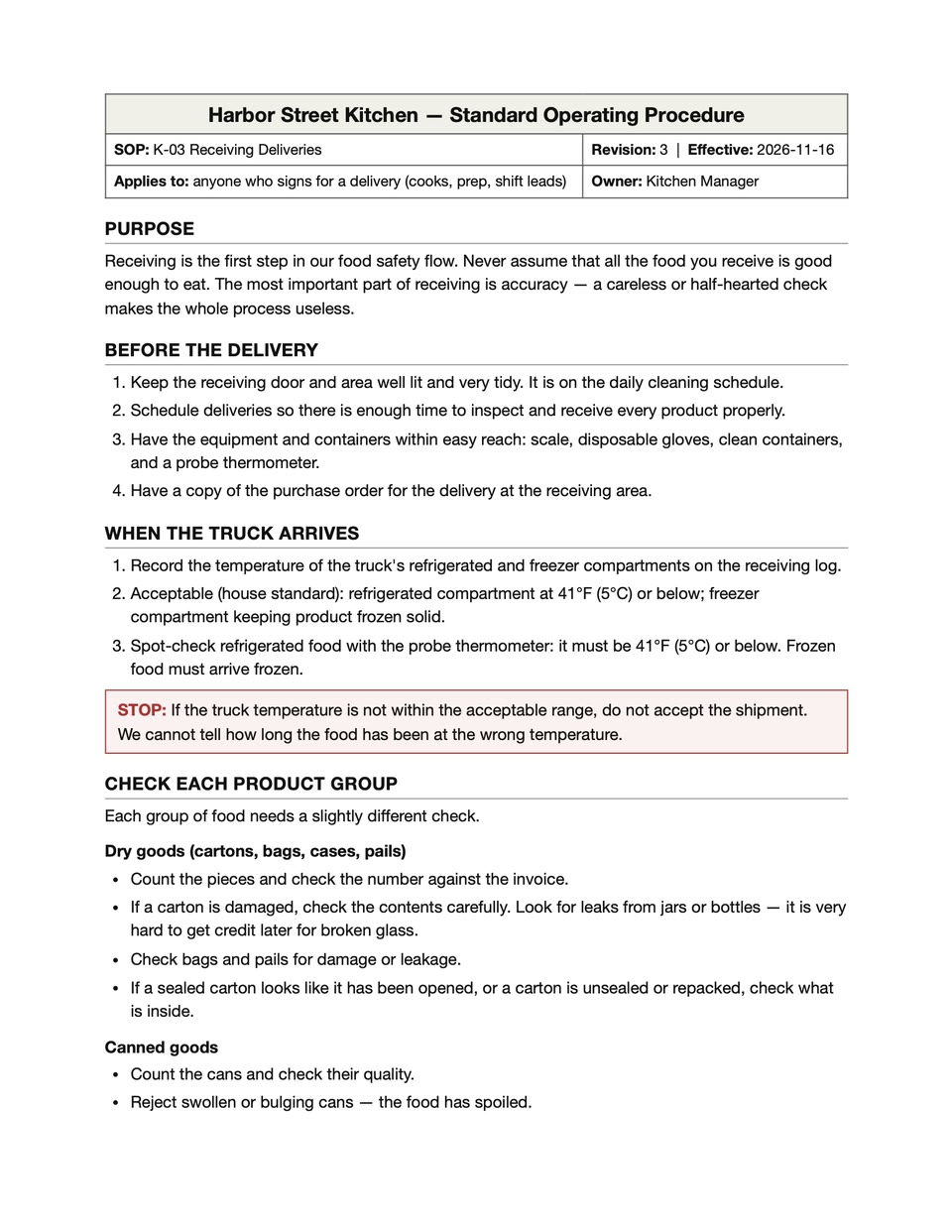
Page 1 of 2 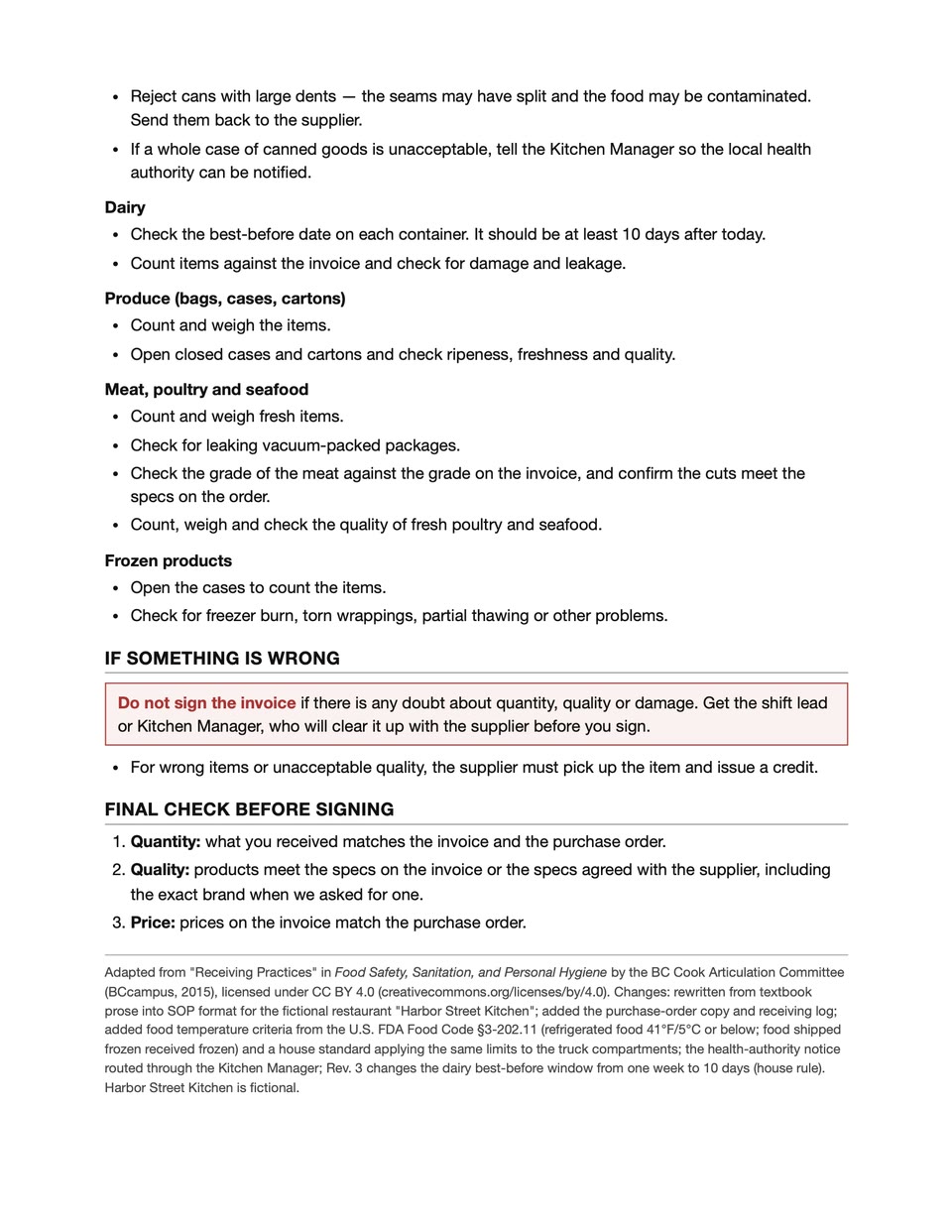
Page 2 of 2
The request
We wrote it the way a kitchen manager might and attached Revision 2 of the SOP. It was the only message before the first video came back.
Hi, I run the kitchen at a small restaurant. Attached is our SOP for receiving deliveries. Can you turn it into a short training video for new cooks so they know what to check when a delivery comes in? Around 2-3 minutes, simple and easy to follow. Please stick to what's in the SOP and don't add new rules.What the agent decided
The request said who the video was for, about how long it should run and to stick to the SOP. The agent decided the rest; the quotes are from its delivery message.
- The order. “The order matches the SOP: Purpose → Before the delivery → When the truck arrives → STOP (truck temperature out of range) → the six product groups → If something is wrong → Final check before signing.”
- 15 scenes, each with its own narration: a title, the purpose, the five steps with a screen for each product group, and a closing reminder with the source credit.
- A bar along the top. “A bar along the top shows new cooks which of the five steps they're on.” The five are Before, Truck, Products, Problems and Sign-off.
- A checklist that builds up. “It has a calm narrator, a checklist that builds up on screen as each point is spoken, and a simple illustration for each section.” The video has 10 drawn pictures; the final check uses three cards instead.
- A full red screen for the STOP rule about truck temperature.
- The source credit. “The last screen carries the source credit printed at the bottom of your SOP. The original material's license requires it, so I kept it.”
For videos made from other kinds of PDF, a survey report, a teacher's guide and a picture book, see PDF to video.
All 47 rules, checked line by line
We make Vividemo, and we did this check ourselves. We split the SOP into its 47 rules and set each one next to the screen where it appears in the Revision 3 video and the line the narrator says. Each time in the table plays the video from that point.
- Rules on screen
- 47 of 47
- Rules in the narration
- 46 of 47
- Rules added that aren't in the SOP
- 0
- Narration lines that aren't rules (headings and the closing)
- 5
- Matches 22 The screen and the narration both say what the SOP says.
- Fewer words 22 The same rule in fewer words, mostly in the narration; the screen keeps more of the SOP's wording.
- On screen only 3 On screen, but not in the narration: one rule, and the reason given for two others.
The agent said as much when it delivered: “To keep it short, the narrator says some points in fewer words. The on-screen text keeps the SOP's fuller wording, for example "Seams may have split — the food may be contaminated."”
Skip the table and go to the rounds
| The SOP says | On screen | The narrator says | Verdict |
|---|---|---|---|
| Purpose | |||
| Receiving is the first step in our food safety flow. | Receiving is the first step in our food safety flow. | “Receiving is the first step in our food safety flow.” | Matches |
| Never assume that all the food you receive is good enough to eat. | Never assume that all the food you receive is good enough to eat. | “Never assume the food you receive is good enough to eat.” | Fewer wordsThe narration leaves out “that all”. |
| The most important part of receiving is accuracy | Accuracy matters most. | “Accuracy matters most.” | Fewer wordsBoth reword it; the closing at 3:00 says “accuracy is the most important part of receiving”. |
| a careless or half-hearted check makes the whole process useless. | A careless or half-hearted check makes the whole process useless. | “A careless check makes the whole process useless.” | Fewer wordsThe narration leaves out “or half-hearted”. |
| Before the delivery | |||
| Keep the receiving door and area well lit and very tidy. | Receiving door and area well lit and very tidy | “Before the delivery: keep the receiving door and area well lit and tidy.” | Fewer wordsThe narration leaves out “very”. |
| It is on the daily cleaning schedule. | It is on the daily cleaning schedule | Not narrated | On screen onlyNot in the narration. |
| Schedule deliveries so there is enough time to inspect and receive every product properly. | Deliveries scheduled with enough time to inspect and receive every product | “Schedule deliveries with enough time to inspect every product.” | Fewer wordsThe screen leaves out “properly”; the narration also leaves out “and receive”. |
| Have the equipment and containers within easy reach: scale, disposable gloves, clean containers, and a probe thermometer. | Within easy reachScale · disposable gloves · clean containers · probe thermometer | “Keep the scale, gloves, clean containers, and probe thermometer within reach.” | Fewer wordsThe narration leaves out “disposable” and “easy”. |
| Have a copy of the purchase order for the delivery at the receiving area. | A copy of the purchase order at the receiving area | “And have a copy of the purchase order ready.” | Fewer wordsThe narration says “ready” for “at the receiving area”. |
| When the truck arrives | |||
| Record the temperature of the truck's refrigerated and freezer compartments on the receiving log. | Record the truck's refrigerated and freezer compartment temperaturesWrite them on the receiving log | “When the truck arrives, record the temperature of the refrigerated and freezer compartments on the receiving log.” | Matches |
| Acceptable (house standard): refrigerated compartment at 41°F (5°C) or below; | Refrigerated compartment 41°F (5°C) or below | “The refrigerated compartment must be forty-one degrees Fahrenheit, five Celsius, or below.” | Fewer wordsSame numbers and units; neither says “house standard”. |
| freezer compartment keeping product frozen solid. | Freezer compartment keeps product frozen solid | “The freezer must keep product frozen solid.” | Matches |
| Spot-check refrigerated food with the probe thermometer: it must be 41°F (5°C) or below. | Spot-check refrigerated food with the probe thermometer 41°F (5°C) or below | “Then spot-check refrigerated food with the probe thermometer: forty-one degrees or below.” | Fewer wordsThe narration says “forty-one degrees” without the units the second time. |
| Frozen food must arrive frozen. | Frozen food must arrive frozen | “Frozen food must arrive frozen.” | Matches |
| STOP: If the truck temperature is not within the acceptable range, do not accept the shipment. | STOPTruck temperature not in the acceptable range?Do not accept the shipment. | “Stop. If the truck temperature is not in range, do not accept the shipment.” | Fewer wordsA full red screen; the narration says “in range” for “within the acceptable range”. |
| We cannot tell how long the food has been at the wrong temperature. | We cannot tell how long the food has been at the wrong temperature. | “We cannot tell how long the food has been at the wrong temperature.” | Matches |
| Check each product group | |||
| Each group of food needs a slightly different check. | Check each product groupEach group of food needs a slightly different check. | “Next, check each product group. Each one needs a slightly different check.” | Matches |
| Dry goods | |||
| Count the pieces and check the number against the invoice. | Count the pieces and check the number against the invoice | “Count the pieces against the invoice.” | Fewer wordsThe narration leaves out “and check the number”. |
| If a carton is damaged, check the contents carefully. | Damaged carton? Check the contents carefully and look for leaking jars or bottles | “If a carton is damaged, check the contents and look for leaking jars or bottles.” | Fewer wordsThe narration leaves out “carefully”. |
| Look for leaks from jars or bottles — it is very hard to get credit later for broken glass. | It is very hard to get credit later for broken glass | “It's very hard to get credit later for broken glass.” | MatchesThe leaks are in the line above, on screen and in the narration. |
| Check bags and pails for damage or leakage. | Check bags and pails for damage or leakage | “Check bags and pails for damage or leaks,” | Matches |
| If a sealed carton looks like it has been opened, or a carton is unsealed or repacked, check what is inside. | Carton opened, unsealed or repacked? Check what is inside | “and check inside any carton that's been opened, unsealed, or repacked.” | Fewer words“A sealed carton looks like it has been opened” becomes “opened”. |
| Canned goods | |||
| Count the cans and check their quality. | Count the cans and check their quality | “Canned goods. Count the cans and check their quality.” | Matches |
| Reject swollen or bulging cans — the food has spoiled. | Reject swollen or bulging cansThe food has spoiled | “Reject swollen or bulging cans, and cans with large dents.” | On screen onlyThe rule is narrated; the reason is on screen only. |
| Reject cans with large dents — the seams may have split and the food may be contaminated. | Reject cans with large dentsSeams may have split — the food may be contaminated | “Reject swollen or bulging cans, and cans with large dents.” | On screen onlyThe rule is narrated, in the same sentence as the one above; the reason is on screen only. |
| Send them back to the supplier. | Send them back to the supplier | “Send them back to the supplier.” | MatchesIn the SOP this sentence ends the large-dents rule; the video gives it a line of its own, after both Reject lines. |
| If a whole case of canned goods is unacceptable, tell the Kitchen Manager so the local health authority can be notified. | Whole case unacceptable? Tell the Kitchen ManagerSo the local health authority can be notified | “If a whole case is unacceptable, tell the Kitchen Manager, so the health authority can be notified.” | Fewer wordsThe narration leaves out “local”. |
| Dairy | |||
| Check the best-before date on each container. | Check the best-before date on each container | “Dairy. Check the best-before date on each container.” | Matches |
| It should be at least 10 days after today. | It should be at least 10 days after today | “It should be at least ten days after today.” | MatchesThe one rule Revision 3 changed: it was one week. |
| Count items against the invoice | Count items against the invoice | “Count against the invoice,” | Fewer wordsThe narration leaves out “items”. |
| and check for damage and leakage. | Check for damage and leakage | “and check for damage and leaks.” | Matches |
| Produce | |||
| Count and weigh the items. | Count and weigh the items | “Count and weigh the items.” | Matches |
| Open closed cases and cartons | Open closed cases and cartons | “Open closed cases and cartons,” | Matches |
| and check ripeness, freshness and quality. | Check ripeness, freshness and quality | “and check ripeness, freshness, and quality.” | Matches |
| Meat, poultry and seafood | |||
| Count and weigh fresh items. | Count and weigh fresh items | “Meat, poultry, and seafood. Count and weigh fresh items,” | Matches |
| Check for leaking vacuum-packed packages. | Check for leaking vacuum-packed packages | “and check for leaking vacuum packs.” | Fewer wordsThe narration says “vacuum packs”. |
| Check the grade of the meat against the grade on the invoice, | Meat grade matches the grade on the invoice | “Check the meat grade against the invoice,” | Fewer wordsBoth put it in fewer words. |
| and confirm the cuts meet the specs on the order. | Cuts meet the specs on the order | “and confirm the cuts meet the order specs.” | Matches |
| Count, weigh and check the quality of fresh poultry and seafood. | Fresh poultry & seafood: count, weigh, check quality | “Count, weigh, and check the quality of fresh poultry and seafood.” | Matches |
| Frozen products | |||
| Open the cases to count the items. | Open the cases to count the items | “Frozen products. Open the cases to count the items.” | Matches |
| Check for freezer burn, torn wrappings, partial thawing or other problems. | Check for freezer burn, torn wrappings, partial thawing or other problems | “Check for freezer burn, torn wrappings, or partial thawing.” | Fewer wordsThe narration leaves out “or other problems”. |
| If something is wrong | |||
| Do not sign the invoice if there is any doubt about quantity, quality or damage. | Any doubt about quantity, quality or damage? Do not sign the invoice | “If there is any doubt about quantity, quality, or damage, do not sign the invoice.” | Matches |
| Get the shift lead or Kitchen Manager, who will clear it up with the supplier before you sign. | Get the shift lead or Kitchen ManagerThey clear it up with the supplier before you sign | “Get the shift lead or Kitchen Manager to clear it up with the supplier first.” | Fewer wordsThe narration says “first” for “before you sign”. |
| For wrong items or unacceptable quality, the supplier must pick up the item and issue a credit. | Wrong items or unacceptable qualityThe supplier must pick up the item and issue a credit | “For wrong items or poor quality, the supplier must pick them up and issue a credit.” | Fewer wordsThe narration says “poor quality” for “unacceptable quality”. |
| Final check before signing | |||
| Quantity: what you received matches the invoice and the purchase order. | QuantityWhat you received matches the invoice and the purchase order | “Quantity matches the invoice and purchase order.” | Fewer wordsThe narration leaves out “what you received”. |
| Quality: products meet the specs on the invoice or the specs agreed with the supplier, including the exact brand when we asked for one. | QualityProducts meet the specs on the invoice or agreed with the supplier — including the exact brand when we asked for one | “Quality meets the specs, including the exact brand when we asked for one.” | Fewer wordsThe narration leaves out “on the invoice or the specs agreed with the supplier”. |
| Price: prices on the invoice match the purchase order. | PricePrices on the invoice match the purchase order | “And prices on the invoice match the purchase order.” | Matches |
Narration that isn't an SOP rule
The narration has 5 lines that aren't rules from the SOP. Two turn a heading into a transition and three close the video; none adds a rule.
- 1:10
Next, check each product group.
A section heading, said as a transition. - 2:47
Before you sign, do a final check.
A section heading, said as a transition. - 3:00
Remember: accuracy is the most important part of receiving.
Repeats the Purpose section. - 3:04
If in doubt, don't sign.
Sums up “If something is wrong”; the agent pointed out this closing line when it delivered. - 3:06
Get your shift lead or Kitchen Manager.
Repeats the second rule of “If something is wrong”.
Ten more lines of the SOP aren't rules, so they aren't in the table: four header lines (the title, the revision and date, who it applies to and the owner), two product headings with their packaging lists, the final-check heading, and three footer lines with the source, the changes and the note that the restaurant is fictional.
Round by round: what we sent and what came back
These four versions came from the same project. For each one: what we sent, word for word; what came back; and what the agent pointed out without being asked. Times are the agent's working time, not counting time spent waiting for our reply.
The first video
We sent, with SOP-K-03-Receiving-Deliveries.pdf attached “Hi, I run the kitchen at a small restaurant. Attached is our SOP for receiving deliveries. Can you turn it into a short training video for new cooks so they know what to check when a delivery comes in? Around 2-3 minutes, simple and easy to follow. Please stick to what's in the SOP and don't add new rules.”
What came back. A 3:13 video at 1920 × 1080, made from Revision 2 of the SOP: 15 scenes with narration, music, a checklist that builds up on screen and 10 drawn pictures.
What the agent pointed out
- It ran over the length we asked for.
“It runs 3 minutes 13 seconds, a little over your target. … If you'd like it under 3 minutes, I can cut the "Why receiving matters" section down to one sentence and shorten the product-group overview. That saves about 15 seconds without dropping any rules.”
We kept the length.
- The closing line is a summary.
“The closing line, "In doubt? Don't sign. Get your shift lead or Kitchen Manager," sums up the SOP's "If something is wrong" section. It isn't a new rule.”
- Gloves and hairnets aren't in the SOP.
“The illustrations are generic and contain no text. They show a cook in gloves and a hairnet or cap. That isn't an SOP rule, but if it doesn't match your kitchen's dress code, I can change the pictures.”
- It ran over the length we asked for.
A new revision of the SOP
We sent, with SOP-K-03-Receiving-Deliveries-Rev3.pdf attached “Thanks, looks good! We just updated the SOP to rev 3 (attached). The only change is in the dairy section: the best-before date now has to be at least 10 days out instead of one week. Can you update the video for that? No need to redo the whole thing, just fix what changed.”
What came back. The Revision 3 video, 3:12: the dairy line recorded again in the same voice, the dairy screen changed to “at least 10 days after today” and the end card changed to Revision 3. The Revision 2 video was kept.
What the agent pointed out
- It changed the end card without being asked.
“End-card credit: it now says "Revision 3" instead of "Revision 2." That label shows which SOP version the video follows, so I updated it too.”
- It checked the rest of the SOP.
“I compared the rev 3 PDF with rev 2. Apart from the new effective date and a line in the source note at the bottom, nothing else changed, so the rest of the video is the same.”
- It changed the end card without being asked.
A Spanish version
We sent “Perfect, thank you. A lot of our cooks speak Spanish as their first language. Could you also make a Spanish version of the rev 3 video? Same content and same look, just in Spanish.”
What came back. A 3:50 Spanish version of the Revision 3 video, with the same pictures and layout and every screen and the narration in Spanish: neutral Latin American Spanish, with the informal “tú”. It runs about 40 seconds longer than the English one.
What the agent pointed out
- Have a Spanish speaker listen first.
“Please have a Spanish speaker listen before you use it.”
- Have a Spanish speaker listen first.
A version with an AI presenter
We sent “Great, thanks. Some of our managers would like a person on screen. Could you make another version of the English rev 3 video with an AI presenter? She should introduce the video at the start, deliver the STOP warning about truck temperature, and give the closing reminder at the end. Everything else stays the same as the rev 3 video. Please keep the wording exactly as in the current script.”
What came back. Two options for the presenter's look, mockups of where she would appear in the three scenes, and a plan. No clip was made yet.
We sent “Go with option 1”
What came back. Three speaking clips. The agent checked each one, kept the closing clip and asked before making the other two again.
We sent “Regenerate both”
What came back. The two new clips, checked again, and the finished presenter version: 3:12, with the same soundtrack as the Revision 3 video and a smaller stop sign on the STOP screen to make room for her.
What the agent pointed out
- Paid clips, confirmed first.
“This version needs paid presenter clips, so I'll confirm with you before generating them.”
- Paid clips, confirmed first.
The other versions: a presenter, Spanish and the default model
Corporate training videos can need a second language or a person on screen. The first two versions below came from more messages in the same project; the third is the same first message and SOP, made with the default agent model.
With an AI presenter
We asked for a presenter who opens the video, gives the STOP warning and closes it, with the wording kept exactly as it was. The presenter is AI-generated. In the agent's words, “she speaks the existing rev 3 narration word for word, in the same narrator voice. The soundtrack is identical to the rev 3 video.” Everything else is the Revision 3 video.
- 3:12
- 34.3 minutes over three rounds
- 2,018.42 credits
In Spanish
Made from the Revision 3 video, with the same pictures and layout, and the narration and every screen in Spanish.
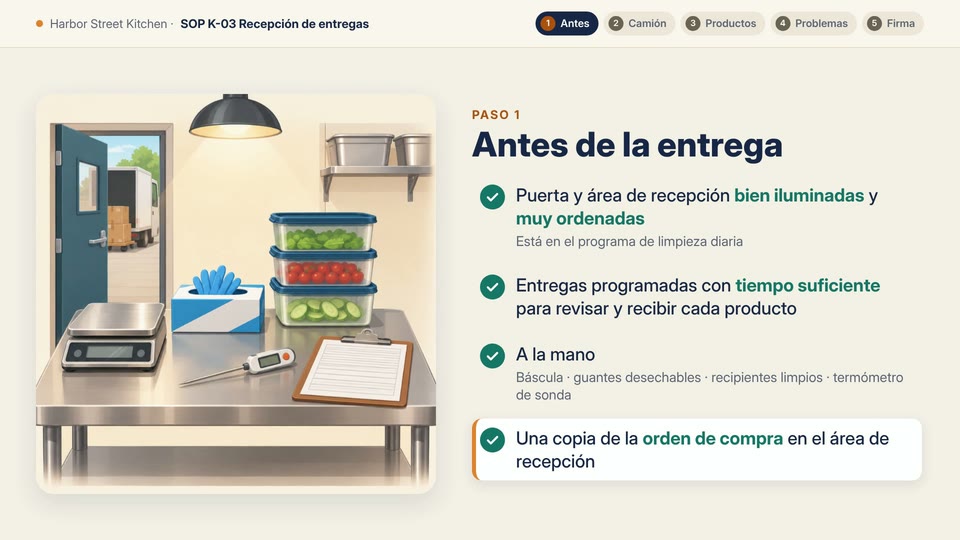
Step 1, Before the delivery, as “Antes de la entrega” 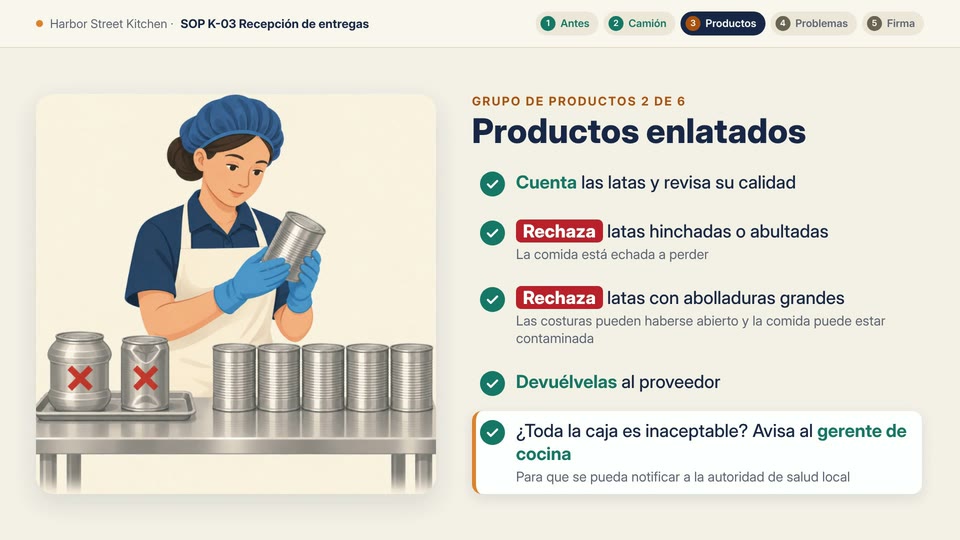
Canned goods, with both Reject rules marked “Rechaza”
- 3:50
- 11.5 minutes
- 590.75 credits
With the default agent model
The same first message and SOP Revision 2, sent in a new project with the default agent model, DeepSeek V4.1 Flash. Narration, music and the full checklist for every step and product group, drawn with icons instead of pictures.
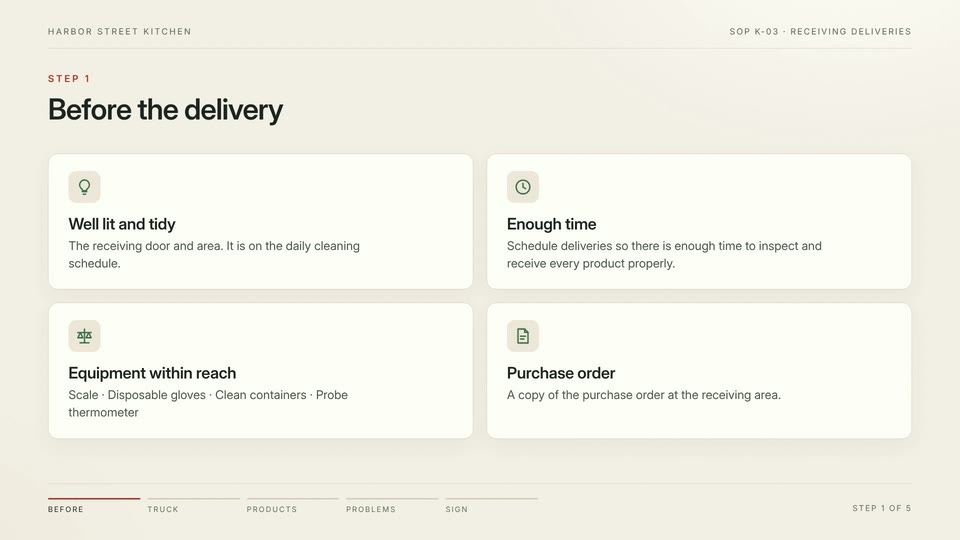
Step 1, as four cards with icons. 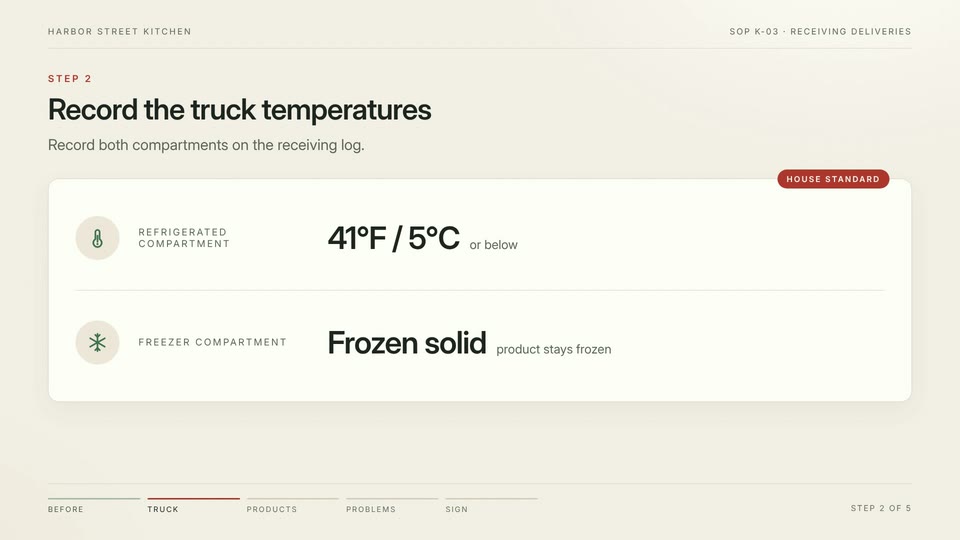
Step 2, the truck temperatures.
- 2:50
- 28.9 minutes
- 199.51 credits
More examples: two instructional videos
The two videos below are instructional videos, not staff training. With the two above, the four videos on this page are three forms: procedure training made from an SOP, a short lesson that works through one idea step by step, and a how-to explainer for beginners. How each was made is on the page linked under it.
How to find the mean A short lesson, step by step A short lesson, step by step
How to find the mean
A lesson on finding the mean, written out step by step in handwritten-style numbers on a white board, with a friendly voiceover: add 3, 5, 7, 9 and 6 to get 30, then divide by how many numbers there are.
“Make a short video teaching how to find the mean. Use a simple example like 3, 5, 7, 9, 6. Show adding the numbers up, then dividing by how many numbers there are, step by step. Friendly voiceover, clean whiteboard style, about 1 minute.”
- Made from
- One English request, no files attached
- Length
- 0:56
- Agent working time
- 9.3 minutes
- Rounds
- One round
- Credits
- 285.36 ≈ $2.85
How do people make AI videos? A how-to explainer for beginners A how-to explainer for beginners
How do people make AI videos?
Our guide to how people make AI videos, as a video: the three ways people make them, the eight-step workflow, what a 15-second candle ad cost and the platform rules before you publish, with narration, music, animated charts and burned-in captions.
- Made from
- The guide's URL and one line about who it's for
- Length
- 1:35
- Agent working time
- 19.0 minutes
- Rounds
- Four rounds, including a second version with footage from two of our other videos
- Credits
- 1,025.83 ≈ $10.26
What each round cost
We make Vividemo, so these are our own numbers, as billed. Credits are metered usage, not a fixed price: the agent model, the voice, the music and any pictures or clips each add to the bill. Times are the agent's working time, not counting time spent waiting for a reply.
| Version | Agent working time | Where the credits went | Credits |
|---|---|---|---|
| First video3:13 · SOP Revision 2, one messageClaude Opus 5.5 | 13.0 minutes |
| 795.65≈ $7.96 |
| SOP revision3:12 · SOP Revision 3, one messageClaude Opus 5.5 | 5.2 minutes |
| 97.87≈ $0.98 |
| Spanish version3:50 · The Revision 3 video, one messageClaude Opus 5.5 | 11.5 minutes |
| 590.75≈ $5.91 |
| Presenter version3:12 · The Revision 3 video, three messagesClaude Opus 5.5 | 34.3 minutes |
| 2,018.42≈ $20.18 |
| Default model2:50 · SOP Revision 2, the same first messageDeepSeek V4.1 Flash | 28.9 minutes |
| 199.51≈ $2 |
The four versions in the first project came to 3,502.69 credits (≈ $35.03); the default-model version was a separate project. Presenter clips are the largest single part of any bill here. The Spanish version was made from the finished English one, with no new music or pictures.
The two instructional videos
| Video | Made from | Agent working time | Credits |
|---|---|---|---|
| How to find the mean0:56 | One English request, no files attached | 9.3 minutesOne round | 285.36≈ $2.85 |
| How do people make AI videos?1:35 | The guide's URL and one line about who it's for | 19.0 minutesFour rounds, including a second version with footage from two of our other videos | 1,025.83≈ $10.26 |
Dollar amounts use the base rate of 100 credits per $1; plans work out to about 116–142 credits per $1. See pricing for plans and credit packs.
What production companies publish
Two production companies publish what a training video costs. These are their figures, in their own words, as we read them on ; neither is a Vividemo price.
“Basic internal training video (simple setup, minimal editing)”
“$1,000 to $5,000”
DMAK Productions, a row of the cost table in “Training Video Production Cost Guide for 2026” (May 22, 2026) https://dmakproductions.com/blog/training-video-production-cost/ “Most of the time training videos will cost between $1,000 and about $4,000 per finished minute unless there are significantly involved add ons in terms of graphics or production needs.”
Beverly Boy Productions, “How Much Does it Cost to Make a Training Video?” (updated January 17, 2025) https://beverlyboy.com/how-much-does-it-cost/how-much-does-it-cost-to-make-a-training-video/
Training video FAQ
What makes a good training video?
It teaches one procedure, keeps to the document it comes from and shows each step on screen as it is said. The video at the top of this page follows one 2-page SOP in its own order: all 47 of its rules are on screen, 46 are in the narration and none were added. See the check, line by line.
How long should a training video be?
As long as the procedure needs, and you can ask for a length. We asked for around 2 to 3 minutes. The 2-page SOP for receiving deliveries became a 3:13 video, and the agent offered to cut about 15 seconds without dropping any rules. After the SOP revision it runs 3:12, with all 47 rules on screen.
Can AI make a training video from an SOP?
Yes. The video at the top of this page came from a 2-page PDF and one message, and a new revision of the SOP took one more message and 5.2 minutes of the agent's working time. Watch the result with the SOP open before your team does, as we did in the line-by-line check. To start from your own SOP, see the training video maker.
What does a training video cost to make?
Production companies publish their own figures. DMAK Productions lists “$1,000 to $5,000” for a “Basic internal training video (simple setup, minimal editing)”, and Beverly Boy Productions writes: “Most of the time training videos will cost between $1,000 and about $4,000 per finished minute unless there are significantly involved add ons in terms of graphics or production needs.” The video at the top of this page used 893.52 credits over two rounds, about $8.94 at the base rate. See what every round cost.
Turn your SOP into a training video
Upload the PDF and say who the video is for, the way this one started. When the SOP changes, reply with the new revision.