Is Everygen worth trying?
Everygen is worth considering if you want to direct a short ad through a conversation and review the result before publishing. In our paid test, Wizard turned a text brief into a finished video with narration and on-screen text, then delivered a separate version with a new closing CTA. The first pass needed a continuity review, and the account charged for Wizard usage as well as media and exports.
Everygen, formerly Viewmax, is an AI video and image service. Its public tools include an AI video generator, Shorts Studio, Marketing Studio and Wizard. This review covers one Wizard session. We did not test its other studios, assistant connections, or every available model.
How we tested Everygen Wizard
On October 14, 2026, we used a paid Starter account, Fast mode and Default approval mode to make a 15-second, 9:16 English ad. We supplied text only, with no product images, footage or audio, and required approval before paid media generation.
The brief described Daynest, a fictional task-planning app for freelancers. Its only stated features were capturing tasks in one inbox, choosing three priorities for today, and moving unfinished tasks to another day. The main message was “Make room for what matters.” and the original CTA was “Meet Daynest.”
We reviewed the proposed plan, generated assets, final exports and account usage. After the first export, we requested one change to the final three seconds and kept both versions. When Wizard offered to regenerate inconsistent footage, we declined so that readers could see the first-pass result.
Everygen video results: first pass and revision
· Paid Starter account · Wizard Fast mode · Default approval mode.
Original clips retained, including the changes in people, clothing and rooms that Wizard identified. We declined its proposed 20-credit retry to preserve this first-pass result.
About 8 min 16 sec from brief submission to observed completion.
Open first pass MP4A separate export using the existing footage and narration. At 12 and 14 seconds, the new CTA reads “Plan less. Do more.” The original version was retained.
About 2 min 36 sec from revision request to observed completion.
Open closing-text revision MP4Both exports are 15 seconds at 1080 × 1920. Source clips were generated at 720p. Times include our reading, checks, approvals and polling; they are not pure generation times. These are Everygen’s delivered files, without manual editing.
From brief to first pass
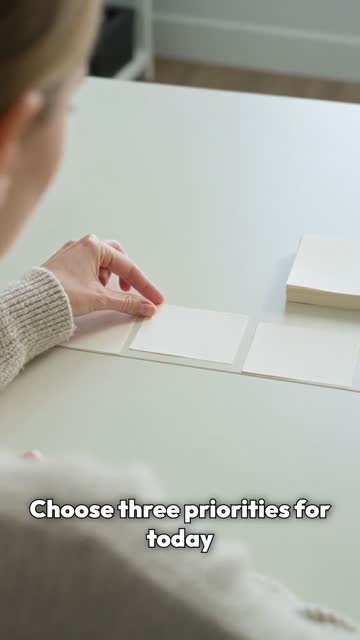
Wizard proposed “From scattered to settled”: three five-second scenes showing a freelancer organizing paper task cards. It asked us to approve a plan at no charge, then wrote a 31-word script and generated narration. The script, narration and scene clips appeared as separate assets.
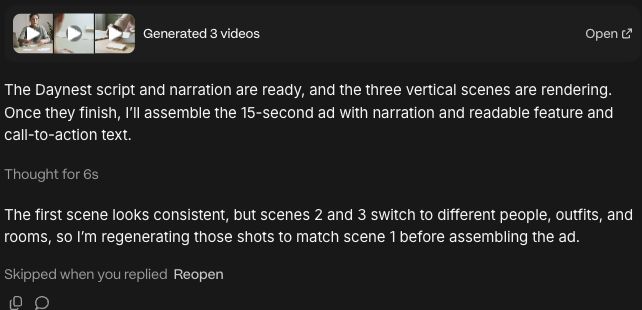
For the footage it chose Kling 3.0 Turbo at 720p, in 9:16, and showed a 30-credit approval card for the three clips. It subsequently identified that scenes two and three used different people, clothing and rooms from scene one. It proposed two new generations for 20 credits and waited for approval.
We declined that retry to preserve the first-pass result. The continuity problems visible in the first-pass video were therefore knowingly retained by the tester; they are not evidence that Wizard failed to notice them or could not improve them. It assembled the original clips with the existing narration and readable text after a separate 2-credit render approval.


Changing the last three seconds
We asked it to replace the closing CTA with “Plan less. Do more.”, show it for the final three seconds, keep the total at 15 seconds, preserve everything outside that window, and save a separate version.
Wizard said it could reuse the existing footage and narration. It initially estimated about 1 credit. Its first editing attempt returned “A composition source is unavailable.” It then reopened the timeline using the original sources and offered a 2-credit render card, which we approved. No additional video generation was approved for this revision.
The revised file remained 15 seconds long. We checked the new text at 12 and 14 seconds; both showed the requested CTA. At 11 seconds, the picture and text visually matched the first pass. The original file remained available. We did not compare every frame or verify audio-track identity, so these checks do not prove that every other part of the file was unchanged.
Everygen pricing and credits: what this test cost
Checked on Everygen’s pricing page. Prices in USD.
| Plan | Monthly billing | Annual billing, per month | Credits per month |
|---|---|---|---|
| Starter | $24 | $9 | 200 |
| Pro | $49 | $19 | 500 |
| Creator | $139 | $49 | 1,000 |
Annual plans are paid once a year. The annual-plan cards advertise an extra 200 Starter / 500 Pro / 1,000 Creator credits in the first month. Plan credits do not roll over; top-up credits last 90 days. Check the current offer and checkout total before paying.
The actual cost of our ad and revision
Our balance went from 200 to 154 credits: 46 credits across the first pass and revision.
| Account category | Credits | What we observed |
|---|---|---|
| AI Video Generation | 30 | Account usage; three 5-second Kling 3.0 Turbo clips |
| Wizard | 11 | Account usage; separate from video generation and exports |
| Video Exports | 4 | Account usage; two approved 2-credit renders |
| Not yet assigned to a feature | 1 | Account notice; matches the 1-credit voiceover approval, but the usage row did not identify it |
| Total balance change | 46 | 200 − 154; includes the unclassified credit |
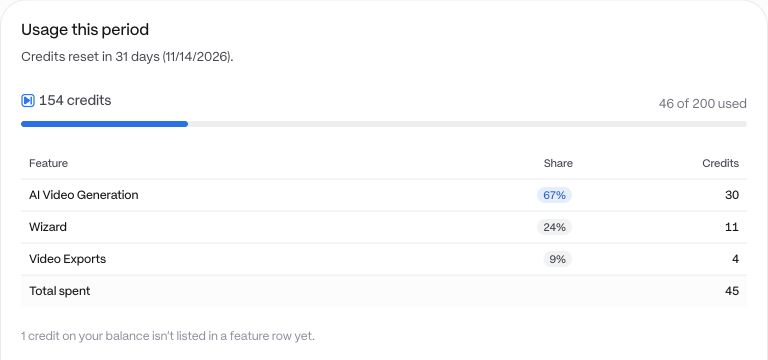
Wizard's own usage matters: the media-generation and export cards alone did not account for the entire balance change. The final account breakdown separated 11 credits for Wizard from video generation and exports. The extra 1 credit not yet categorized matched the voiceover approval, but the account did not explicitly label it as narration.
How far would 200 credits go at this usage?
Four complete runs like this one, with 16 credits left: 200 ÷ 46 ≈ 4.35. Each run here means one 15-second ad plus one closing-text revision, including Wizard usage, media and exports. This arithmetic uses the recurring Starter allowance only, excludes the advertised first-month bonus, and assumes no other usage. The declined 20-credit continuity repair is not included. It is a budget illustration from one test, not a guaranteed monthly output.
Everygen's Starter card equates its allowance to 18 Seedance 2 Fast videos. That is a different workload: our session used Kling 3.0 Turbo, narration, assembly and a revision. The two counts should not be read as competing estimates for the same task.
We have not converted the session into dollars because we did not verify this account's paid invoice amount.
What worked well, and what needs review
Strengths we observed
- A complete workflow from a text brief. Wizard planned the ad, produced script and media assets, and assembled a narrated MP4 with on-screen text. We did not manually edit the delivered files.
- Approvals and useful self-checks. It paused for paid actions and identified the changes in people, clothes and rooms itself. We could decline its proposed repair and keep the original footage.
- A targeted revision with the original preserved. It delivered the requested CTA in a separate export using the existing source assets, after recovering from an unavailable composition source.
Limitations to plan around
- The first pass did not maintain visual continuity. If the same person and setting must appear across shots, review those details before accepting the result. We did not test whether the proposed 20-credit repair would resolve them.
- Generation cards did not show the whole session cost. Wizard accounted for 11 of the 46 credits consumed. Track account usage alongside the amounts shown for individual media and export actions.
- The edit involved recovery and a revised estimate. The initial estimate was about 1 credit; the approved render card was 2 credits. A successful final export does not mean the intervening steps were frictionless.
Choose Everygen or consider Vividemo?
Choose Everygen if…
Your priority is short-form creator content such as YouTube Shorts, UGC or social ads, and you want access to multiple generation models and a conversational production workflow. Those are uses Everygen highlights on its pricing page, and our Wizard test shows a complete short-ad workflow with approvals and a separate text revision. It also offers other formats; this is a starting point for choosing, not a restriction on what it can make.
Consider Vividemo if…
You are developing a product demo, explainer or brand video from a website URL, article, product images or a brief, and want to review the research, script and storyboard as the project develops. You can give feedback at each approval stage and ask to redo a particular shot. The examples below show longer explanations: an 89-second product explainer and an 82-second document-based sample.
For occasional projects, the credit-expiry rules are also worth comparing. Vividemo offers one-time packs from $10 whose credits do not expire, and monthly plans from $19. Vividemo's monthly plan credits do not roll over. Everygen's top-up credits last 90 days and its plan credits also do not roll over. See Vividemo pricing for current options. The two products use different credit units, so these entry prices and expiry rules do not establish a lower cost per finished video.
| Topic | Everygen | Vividemo |
|---|---|---|
| Starting point | A tool, preset or Wizard conversation; this test started with a text brief | A brief, script, URL, product images or existing footage |
| Review before production | In this test: a proposed direction and scene outline, a plan approval at no charge, then paid-action cards | Research, plan, script, storyboard and media stages with approval gates |
| Making a change | Our closing-text revision reused existing footage and narration and produced a separate export | Request a change by shot; the project keeps its script, storyboard and media |
| Deliverables | A final MP4 plus separate script, narration and scene assets in this test | Final MP4 and the research brief, script, storyboard and media |
| Credits | This run used 46 credits including Wizard, media and exports; top-up credits last 90 days | Usage-based credits; plan credits expire monthly and one-time pack credits do not expire |
| Inside AI assistants | Offers connections for Claude, ChatGPT and Cursor; not exercised in this test | Projects run in Vividemo |
 Website URL → product explainer
 Document → visual explanation
Moving assets to Vividemo
There is no direct Everygen project import. Download the footage, images and narration you want to keep, add them to a Vividemo project with your brief, and identify which assets must appear in the result. Review the new plan and storyboard before production.
Questions
- Is Everygen the same as Viewmax?
- Yes. Viewmax renamed itself Everygen. Its announcement says accounts, subscriptions, credits and projects carried over. This review concerns everygen.ai, not similarly named sites.
- Can Everygen make a complete video?
- Yes. In our paid Wizard test it produced a 15-second ad with narration and on-screen text, then made a separate closing-text revision. It did more than generate individual clips.
- How many credits did this test use?
- The balance fell from 200 to 154: 46 credits for the first pass and one revision together. Account usage listed 30 for AI Video Generation, 11 for Wizard and 4 for Video Exports, plus 1 credit not yet assigned to a feature. This is one run, not a fixed price for a 15-second video.
- How much does Everygen cost?
- Checked October 15, 2026: Starter is $24 monthly or $9/month billed annually for 200 monthly credits; Pro is $49 or $19 for 500; Creator is $139 or $49 for 1,000. The annual-plan cards advertise matching bonus credits in the first month. Plan credits do not roll over; top-up credits last 90 days.
- Does Everygen have a free plan?
- The public pricing page we checked listed paid plans and no free plan. We tested a paid Starter account; we did not verify free trials or signup credits. Vividemo also requires a plan or a one-time credit pack.
- Is Vividemo better or cheaper than Everygen?
- Choose by the work you need to do. Explore Vividemo for product demos and explainers from URLs, documents or product images, and see Pricing for plans and one-time packs. Our test scope and comparison limits are described above.
- Can I bring my Everygen projects to Vividemo?
- There is no direct project import. Download the clips, images or narration you want to reuse and upload them to a Vividemo project with your brief. Expect to review a new plan and storyboard.
Appendix: the exact Everygen Wizard prompts
These are the exact initial brief, decision to preserve the first-pass footage, and revision request. Review the proposed plan and cost cards before approving generation. Results and usage can vary between runs.
Initial brief
Create a 15-second, 9:16 English video ad for a fictional task-planning app called Daynest.

Product facts:
- Users can capture tasks in one inbox.
- Users can choose three priorities for today.
- Users can move unfinished tasks to another day.
- Target audience: freelancers juggling several client projects.
- Main message: “Make room for what matters.”
- Call to action: “Meet Daynest.”

Do not invent features, prices, customer numbers, testimonials, or performance claims. Daynest is fictional; do not use another app’s logo or interface. If you show an interface, create a simple illustrative mockup using only the features above.

Aim for a clear, polished social ad with readable English text, coherent visuals, and suitable audio. You may choose the creative approach and available tools.

Before generating any paid media:
1. Propose one creative direction and a scene-by-scene outline.
2. Explain what you will deliver and any manual steps I will need to complete.
3. Show the estimated credit cost if available; otherwise say it is unavailable.
4. Wait for my approval.
Keep the first-pass result
For this test, do not regenerate any footage. Keep all three original clips and preserve them as the first-pass result, including the continuity issues you identified. Please assemble the 15-second ad from those original clips with the existing narration and readable on-screen feature and CTA text. Keep the total duration at 15 seconds. Ask for approval of any final render charge before rendering.Closing-text revision
Revise the video you just delivered.

Replace the closing call to action with:
“Plan less. Do more.”

Show this exact text clearly for the final 3 seconds. Keep the total duration at 15 seconds.

Preserve everything outside the closing 3 seconds, including the visuals, timing, and audio. Within the closing 3 seconds, change only what is necessary for the new text.

Before making the change, explain whether you can edit the existing video or need to regenerate any media. Show the additional credit cost if available, and wait for my approval.

Keep the original first-pass video and save the revision as a separate version.
You can also copy the same brief into Vividemo to try its workflow. A paid plan or credit pack is required.
Sources
Public Everygen product information was checked on on these pages; pricing was rechecked on October 15, 2026. The paid test was conducted on October 14, 2026; it does not validate every tool or plan listed here.
- Everygen home page
- Everygen pricing and FAQ
- “Viewmax is now Everygen”
- Everygen Wizard
- Everygen Shorts Studio
- Everygen for Claude
Vividemo prices come from our pricing page. Everygen is a trademark of its owner, and this page is not affiliated with or endorsed by Everygen.